Yandex Parser
Using the ScrapeOps Parser API you can scrape Yandex Pages without having to maintain your own product parsers.
Simply send the HTML of the Yandex Pages to the Parser API endpoint, and receive the data in structured JSON format.
Yandex Endpoint:
"https://parser.scrapeops.io/v2/yandex"
The Yandex Parser supports the following page types:
Authorisation - API Key
To use the ScrapeOps Parser API, you first need an API key which you can get by signing up for a free account here.
Your API key must be included with every request using the api_key query parameter otherwise the API will return a 403 Forbidden Access status code.
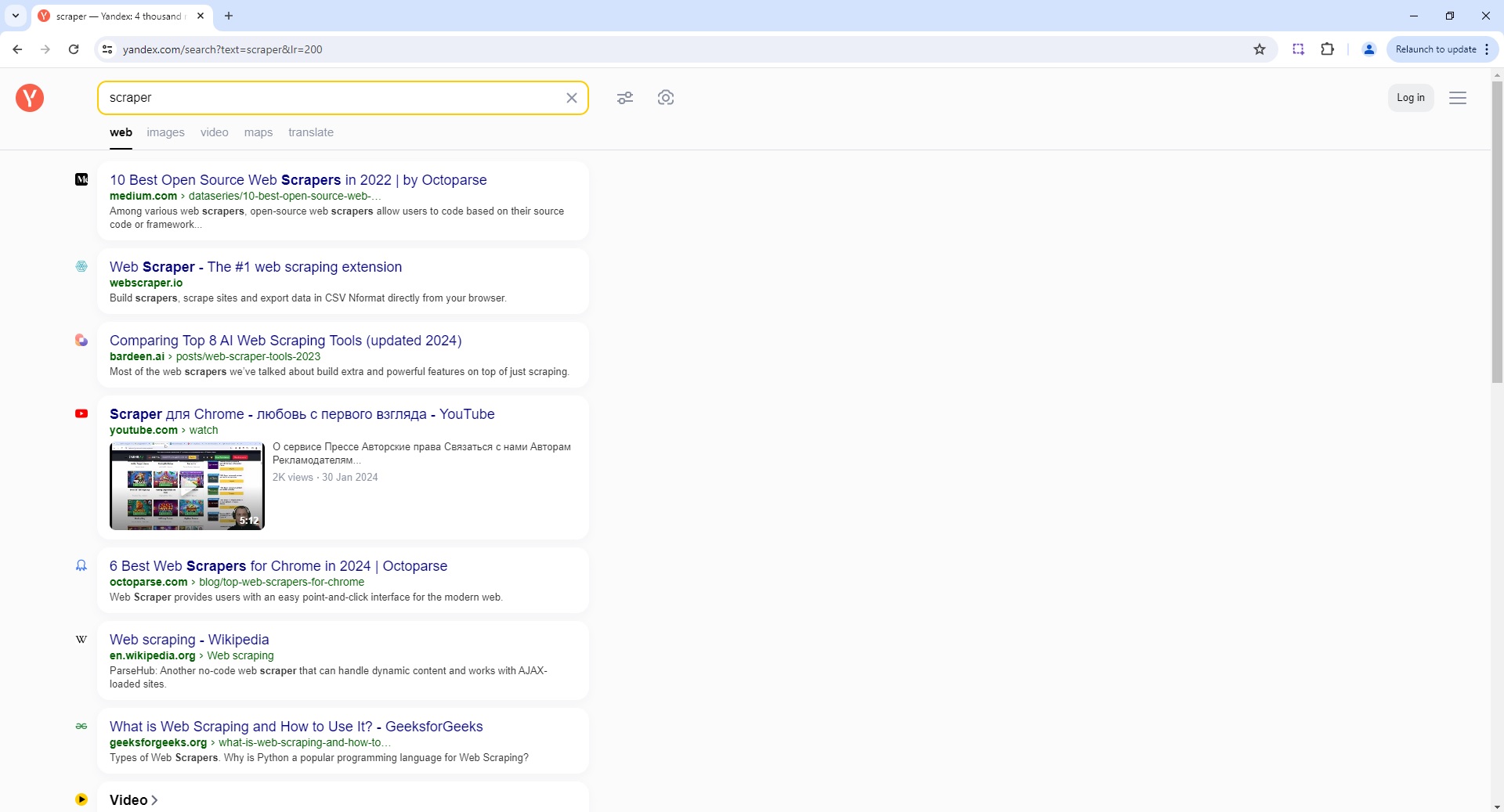
Yandex Search Page Parser
To use the Parser API without the ScrapeOps Proxy Aggregator, you first need to retrieve the HTML of the page you want to extract the data from.
For example, here we retrieve the HTML from the following Yandex Search Page with a very simple GET request:
import requests

response = requests.get('https://yandex.com/search?text=scraper&lr=200')

if response.status_code == 200:
    html = response.text
    print(html)
Next, we send this HTML to the ScrapeOps Parser API for data extraction using a POST request:
import requests

response = requests.get('https://yandex.com/search?text=scraper&lr=200')

if response.status_code == 200:
    html = response.text

    data = {
        'url': 'https://yandex.com/search?text=scraper&lr=200',
        'html': html,
    }

    response = requests.post(
        url='https://parser.scrapeops.io/v2/yandex',
        params={'api_key': 'YOUR_API_KEY'},
        json=data
    )

    print(response.json())
The API will return a JSON response with the following data (status, data, url):
{
	"data": {
		"search_information": {
			"query": "scraper"
		},
		"search_pagination": [
			{
				"current": true,
				"page_number": 1
			},
			{
				"page_number": 2,
				"url": "https://yandex.com/search/?text=scraper&lr=200&p=1"
			},
			{
				"page_number": 3,
				"url": "https://yandex.com/search/?text=scraper&lr=200&p=2"
			},
			{
				"page_number": 4,
				"url": "https://yandex.com/search/?text=scraper&lr=200&p=3"
			},
			{
				"page_number": 5,
				"url": "https://yandex.com/search/?text=scraper&lr=200&p=4"
			}
		],
		"search_results": [
			{
				"path": "medium.com › dataseries/10-best-open-source-web-…",
				"snippet": "Among various web scrapers , open-source web scrapers allow users to code based on their source code or framework, and fuel a massive part to help scrape in a fast, simple but...",
				"title": "10 Best Open Source Web Scrapers in 2022 | by Octoparse | Medium",
				"url": "https://medium.com/dataseries/10-best-open-source-web-scraper-in-2022-41df3986f9c7"
			},
			{
				"path": "youtube.com › watch",
				"snippet": "О сервисе Прессе Авторские права Связаться с нами Авторам Рекламодателям...",
				"title": "Scraper для Chrome - любовь с первого взгляда - YouTube",
				"url": "https://www.youtube.com/watch?v=VxtxQfqezzo",
				"video_date": " 30 Jan 2024",
				"video_duration": "5:12",
				"video_preview": "https://video-preview.s3.yandex.net/z1YBQwIAAAA.mp4",
				"video_views": "2K views"
			},
			{
				"path": "webscraper.io",
				"snippet": "Build scrapers , scrape sites and export data in CSV Nformat directly from your browser.",
				"title": "Web Scraper - The #1 web scraping extension",
				"url": "https://webscraper.io/"
			}
			...
		]
	},
	"status": "parse_successful",
	"url": "https://yandex.com/search/?text=scraper&lr=200&ncrnd=21844"
}
A full example JSON response can be found here.
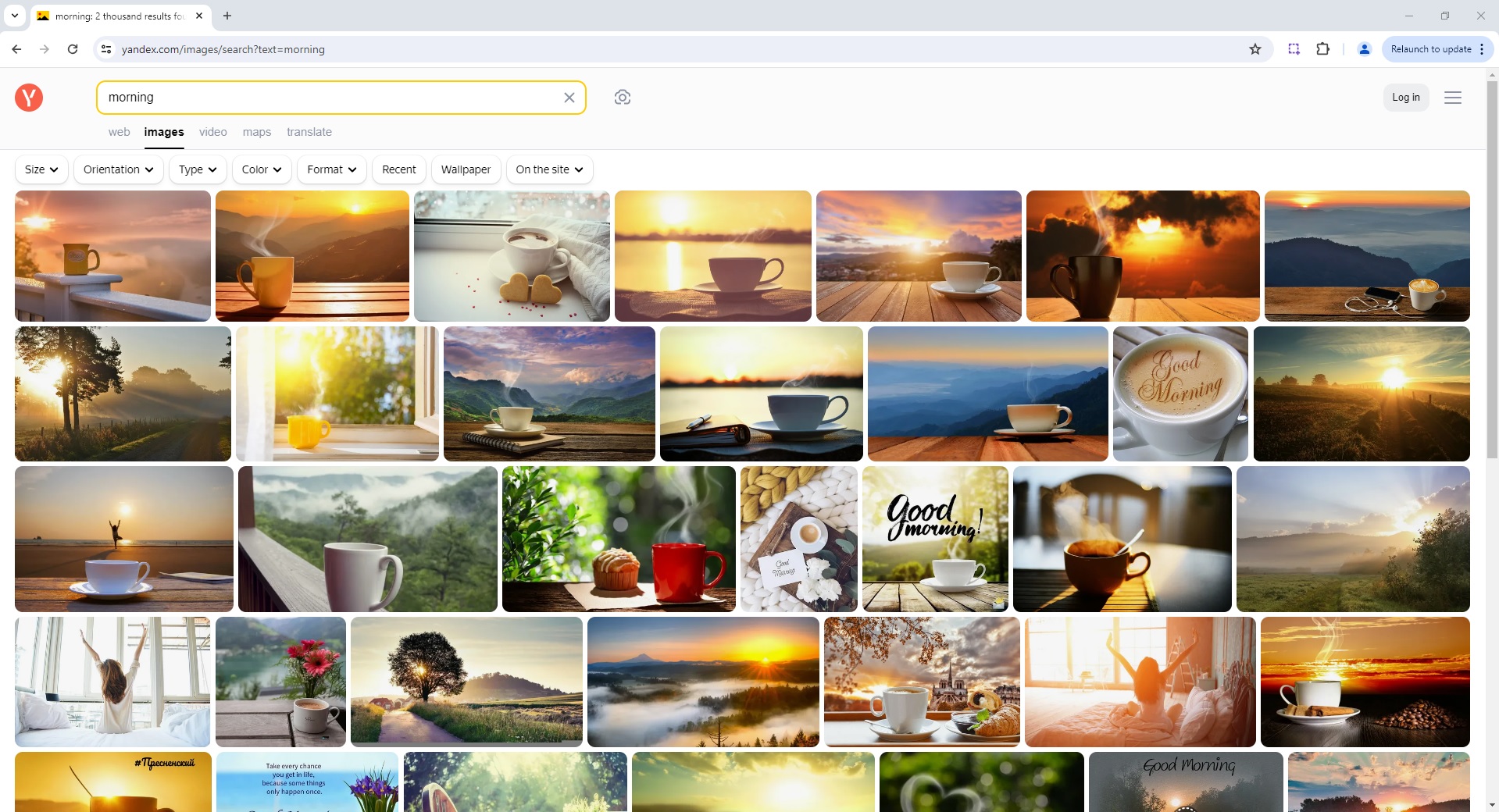
Yandex Image Search Page Parser
To use the Parser API without the ScrapeOps Proxy Aggregator, you first need to retrieve the HTML of the page you want to extract the data from.
For example, here we retrieve the HTML from the following Yandex Image Search Page with a very simple GET request:
import requests

response = requests.get('https://yandex.com/images/search?text=morning')

if response.status_code == 200:
    html = response.text
    print(html)
Next, we send this HTML to the ScrapeOps Parser API for data extraction using a POST request:
import requests

response = requests.get('https://yandex.com/images/search?text=morning')

if response.status_code == 200:
    html = response.text

    data = {
        'url': 'https://yandex.com/images/search?text=morning',
        'html': html,
    }

    response = requests.post(
        url='https://parser.scrapeops.io/v2/yandex',
        params={'api_key': 'YOUR_API_KEY'},
        json=data
    )

    print(response.json())
The API will return a JSON response with the following data (status, data, url):
{
	"data": {
		"related_searches": [
			{
				"text": "morning girl",
				"url": "https://yandex.com/images/search?nomisspell=1&text=morning%20girl&source=related-0"
			},
			{
				"text": "morning animation",
				"url": "https://yandex.com/images/search?nomisspell=1&text=morning%20animation&source=related-1"
			},
			{
				"text": "good morning",
				"url": "https://yandex.com/images/search?nomisspell=1&text=good%20morning&source=related-2"
			}
			...
		],
		"search_information": {
			"query": "morning"
		},
		"search_results": [
			{
				"domain": "sixthandi.org",
				"duplicates": [
					{
						"height": 1414,
						"image": "https://imageio.forbes.com/specials-images/imageserve/1125868527/0x0.jpg?format=jpg&width=1200",
						"width": 7000
					},
					{
						"height": 1414,
						"image": "https://cf.creatrip.com/original/blog/9483/aiew1219rip7u1lczaw1fi3mh3xoe7bb.jpg",
						"width": 2800
					},
					{
						"height": 1414,
						"image": "https://thesungazette.com/wp-content/uploads/2021/03/adobe-a2-notes_awakening_daylight_saving.jpg",
						"width": 2160
					},
					{
						"height": 1414,
						"image": "https://sun9-35.userapi.com/impg/iLc4Rj0YMIwy7nQrKjgSm22CI8BwFVqQgR9V9g/9HR16Gpek5A.jpg?size=600x400&quality=96&sign=b531a48b4d5df5c53424d10965e299f7&type=album",
						"width": 600
					}
				],
				"height": 1414,
				"image": "https://cdn.sixthandi.org/wp/wp-content/uploads/2020/03/iStock-1125868527.jpg",
				"snippet_url": "https://www.sixthandi.org/event/morning-intention-setting-and-prayers-110/",
				"text": "<b>Morning</b> Intention-Setting and Prayers - Sixth & I.",
				"title": "Morning Intention-Setting and Prayers - Sixth & I",
				"url": "https://yandex.com/images/search?pos=4&img_url=https%3A%2F%2Fcdn.businessinsider.es%2Fsites%2Fnavi.axelspringer.es%2Fpublic%2Fmedia%2Fimage%2F2022%2F11%2Fcalor-sol-ventana-2868041.jpg%3Ftf%3D3840x&text=morning&rpt=simage",
				"width": 2121
			},
			{
				"domain": "wallpapers.com",
				"duplicates": [
					{
						"height": 850,
						"image": "https://rare-gallery.com/uploads/posts/1232987-morning.jpg",
						"width": 3840
					},
					{
						"height": 850,
						"image": "https://img4.goodfon.com/original/2880x1800/4/b6/kofe-coffee-cup-rassvet-chashka-good-morning-hot-utro.jpg",
						"width": 2880
					},
					{
						"height": 850,
						"image": "https://gagaru.club/uploads/posts/2023-02/1676907397_gagaru-club-p-krasivie-otkritki-s-dobrim-utrom-priroda-i-89.jpg",
						"width": 2048
					}
				],
				"height": 850,
				"image": "https://wallpapers.com/images/hd/morning-steaming-coffee-40ffj2h2cnhwg72u.jpg",
				"snippet_url": "https://wallpapers.com/wallpapers/morning-steaming-coffee-40ffj2h2cnhwg72u.html",
				"text": "<b>Morning</b> Glory Wallpapers. ",
				"title": "Download Morning Steaming Coffee Wallpaper Wallpapers.com",
				"url": "https://yandex.com/images/search?pos=9&img_url=https%3A%2F%2Fscontent-hel2-1.cdninstagram.com%2Fv%2Ft51.2885-15%2Fe35%2F82810861_2681244052091309_6091225924407630508_n.jpg%3F_nc_ht%3Dscontent-hel2-1.cdninstagram.com%26_nc_cat%3D105%26_nc_ohc%3D8_rE0d2aZeoAX8PQGL4%26oh%3D50ab4fed80972e10e7463966d2a22f21%26oe%3D5F387340&text=morning&rpt=simage",
				"width": 1332
			}
			...
		]
	},
	"status": "parse_successful",
	"url": "https://yandex.com/images/search?text=morning"
}
A full example JSON response can be found here.
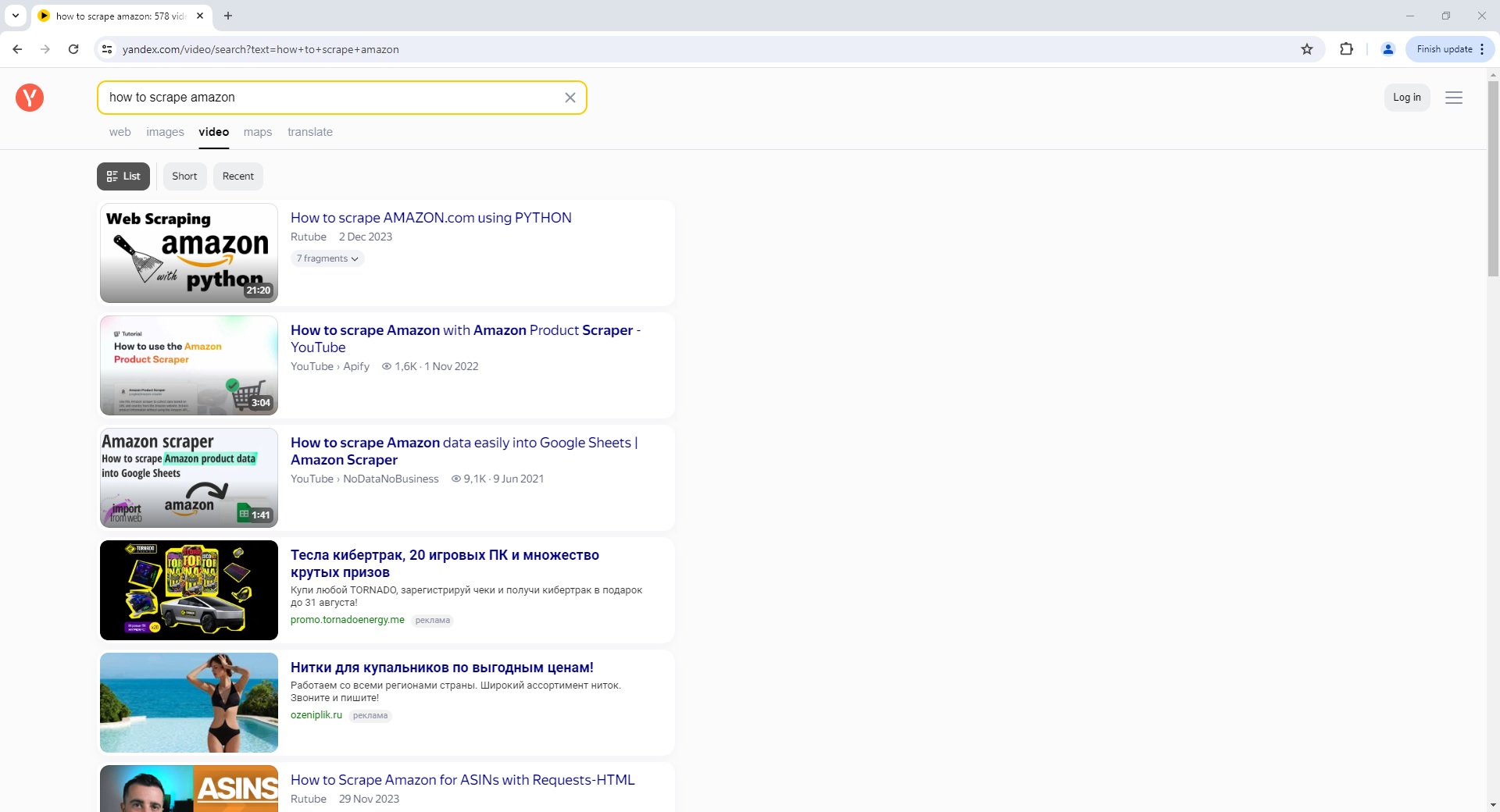
Yandex Video Search Page Parser
To use the Parser API without the ScrapeOps Proxy Aggregator, you first need to retrieve the HTML of the page you want to extract the data from.
For example, here we retrieve the HTML from the following Yandex Video Search Page with a very simple GET request:
import requests

response = requests.get('https://yandex.com/video/search?text=how+to+scrape+amazon')

if response.status_code == 200:
    html = response.text
    print(html)
Next, we send this HTML to the ScrapeOps Parser API for data extraction using a POST request:
import requests

response = requests.get('https://yandex.com/video/search?text=how+to+scrape+amazon')

if response.status_code == 200:
    html = response.text

    data = {
        'url': 'https://yandex.com/video/search?text=how+to+scrape+amazon',
        'html': html,
    }

    response = requests.post(
        url='https://parser.scrapeops.io/v2/yandex',
        params={'api_key': 'YOUR_API_KEY'},
        json=data
    )

    print(response.json())
The API will return a JSON response with the following data (status, data, url):
{
	"data": {
		"search_information": {
			"query": "how to scrape amazon",
			"title": "how to scrape amazon — Yandex video search",
			"total_count": 578
		},
		"search_results": [
			{
				"date": "2 Dec 2023",
				"domain": "rutube.ru",
				"duration": "21:20",
				"duration_seconds": 1280,
				"id": "12630465462711797038",
				"keypoints": [
					{
						"text": "Начало работы с WebScraping",
						"time": "00:03",
						"time_seconds": 3
					},
					{
						"text": "Создание простейшего веб-драйвера для Chrome",
						"time": "01:06",
						"time_seconds": 66
					}
					...
				],
				"preview": "https://video-preview.s3.yandex.net/E_7zUgEAAAA.mp4",
				"screen_height": 1080,
				"screen_ratio": 1.77777,
				"screen_width": 1920,
				"source": "http://rutube.ru/video/c5c80a726bdc29d18547ac72a1548e13/",
				"thumbnail": "https://yandex.com//avatars.mds.yandex.net/get-vthumb/1016939/ea2e2bbc0dc13b6553adc2063876d341/564x318_1",
				"title": "How to scrape AMAZON.com using PYTHON",
				"url": "https://yandex.com/preview/12630465462711797038?text=how+to+scrape+amazon"
			},
			{
				"channel_link": "http://www.youtube.com/@umisoft",
				"channel_name": "Umisoft",
				"channel_url": "https://yandex.com/video/search?channelId=d3d3LnlvdXR1YmUuY29tO1VDMHo2ekt5YjFOd2ZIdndCd21YalA5QQ%3D%3D&how=tm&text=Umisoft",
				"date": "14 Sep 2022",
				"domain": "youtube.com",
				"duration": "5:43",
				"duration_seconds": 343,
				"id": "3546424970847436799",
				"preview": "https://video-preview.s3.yandex.net/OiO8NQIAAAA.mp4",
				"screen_height": 720,
				"screen_ratio": 1.77777,
				"screen_width": 1280,
				"source": "http://www.youtube.com/watch?v=sXVWLkOyGLU",
				"thumbnail": "https://yandex.com//avatars.mds.yandex.net/get-vthumb/4224324/8e799a1d11e70265c97e220165512a98/564x318_1",
				"title": "How to Scrape Amazon Products data Automatically using a Scraping Tool",
				"url": "https://yandex.com/preview/3546424970847436799?text=how+to+scrape+amazon",
				"view_count": "5,5K"
			}
			...
		]
	},
	"status": "parse_successful",
	"url": "https://yandex.com/video/search?text=how+to+scrape+amazon"
}
A full example JSON response can be found here.
Proxy API Integration
The ScrapeOps Parser API is integrated into the ScrapeOps Proxy API Aggregator and can be used for free by using the Auto Extract functionality.
So if you already have a Proxy API Aggregator plan then use the Parser API for no extra charge.
The following example shows you how to use the Parser API via a Python Requests based scraper using the Proxy API Aggregator:
import requests

response = requests.get(
  url='https://proxy.scrapeops.io/v1/',
  params={
      'api_key': 'YOUR_API_KEY',
      'url': 'https://yandex.com/search?text=scraper&lr=200',
      'auto_extract': 'yandex'
  }
)

print(response.json())