Google Scholar Parser
Using the ScrapeOps Parser API you can scrape Google Scholar Pages without having to maintain your own product parsers.
Simply send the HTML of the Google Scholar Pages to the Parser API endpoint, and receive the data in structured JSON format.
Google Scholar Parser API Endpoint:
"https://parser.scrapeops.io/v2/google"
The Google Scholar Parser supports the following page types:
Authorisation - API Key
To use the ScrapeOps Parser API, you first need an API key which you can get by signing up for a free account here.
Your API key must be included with every request using the api_key query parameter otherwise the API will return a 403 Forbidden Access status code.
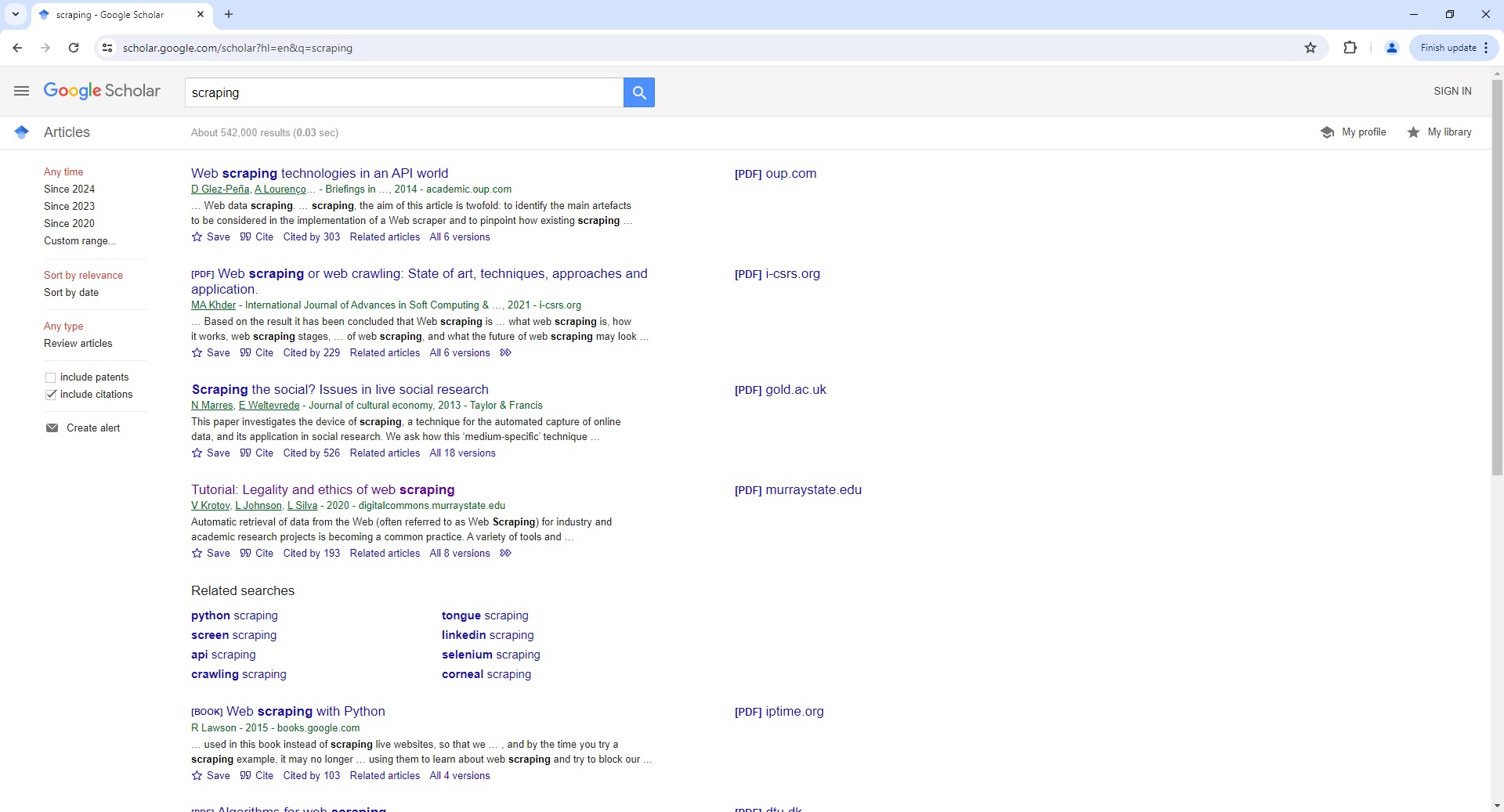
Google Scholar Search Page Parser
To use the Parser API without the ScrapeOps Proxy Aggregator, you first need to retrieve the HTML of the page you want to extract the data from.
For example, here we retrieve the HTML from the following Google Scholar Search Page with a very simple GET request:
import requests

response = requests.get('https://scholar.google.com/scholar?hl=en&q=scraping')

if response.status_code == 200:
    html = response.text
    print(html)
Next, we send this HTML to the ScrapeOps Parser API for data extraction using a POST request:
import requests

response = requests.get('https://scholar.google.com/scholar?hl=en&q=scraping')

if response.status_code == 200:
    html = response.text

    data = {
        'url': 'https://scholar.google.com/scholar?hl=en&q=scraping',
        'html': html,
    }

    response = requests.post(
        url='https://parser.scrapeops.io/v2/google',
        params={'api_key': 'YOUR_API_KEY'},
        json=data
    )

    print(response.json())
The API will return a JSON response with the following data (status, data, url):
{
	"data": {
		"related_searches": [
			{
				"text": "python scraping",
				"url": "/scholar?hl=en&as_sdt=0,5&qsp=1&q=python+scraping&qst=ib"
			},
			{
				"text": "screen scraping",
				"url": "/scholar?hl=en&as_sdt=0,5&qsp=2&q=screen+scraping&qst=ib"
			}
			...
		],
		"search_information": {
			"time_taken": 0.03,
			"total_results": 542000
		},
		"search_pagination": [
			"https://scholar.google.com/scholar?start=10&q=scraping&hl=en&as_sdt=0,5",
			"https://scholar.google.com/scholar?start=20&q=scraping&hl=en&as_sdt=0,5",
			"https://scholar.google.com/scholar?start=30&q=scraping&hl=en&as_sdt=0,5"
			...
		],
		"search_results": [
			{
				"links": [
					{
						"text": "Cited by 303",
						"url": "https://scholar.google.com/scholar?cites=12053031440602299581&as_sdt=2005&sciodt=0,5&hl=en"
					},
					{
						"text": "Related articles",
						"url": "https://scholar.google.com/scholar?q=related:vfy2Szz4RKcJ:scholar.google.com/&scioq=scraping&hl=en&as_sdt=0,5"
					},
					{
						"text": "All 6 versions",
						"url": "https://scholar.google.com/scholar?cluster=12053031440602299581&hl=en&as_sdt=0,5"
					}
				],
				"publish_info": {
					"authors": [
						{
							"name": "D Glez"
						}
					],
					"date": "A Lourenço …",
					"journal": "Peña",
					"publisher": "Briefings in …, 2014"
				},
				"snippet": "… Web data scraping . … scraping , the aim of this article is twofold: to identify the main artefacts to be considered in the implementation of a Web scraper and to pinpoint how existing scraping …",
				"title": "Web scraping technologies in an API world",
				"url": "https://academic.oup.com/bib/article-abstract/15/5/788/2422275"
			},
			{
				"links": [
					{
						"text": "Cited by 229",
						"url": "https://scholar.google.com/scholar?cites=7148673095289091519&as_sdt=2005&sciodt=0,5&hl=en"
					},
					{
						"text": "Related articles",
						"url": "https://scholar.google.com/scholar?q=related:vzUZDE4wNWMJ:scholar.google.com/&scioq=scraping&hl=en&as_sdt=0,5"
					},
					{
						"text": "All 6 versions",
						"url": "https://scholar.google.com/scholar?cluster=7148673095289091519&hl=en&as_sdt=0,5"
					},
					{
						"text": "View as HTML",
						"url": "http://scholar.googleusercontent.com/scholar?q=cache:vzUZDE4wNWMJ:scholar.google.com/+scraping&hl=en&as_sdt=0,5"
					}
				],
				"publish_info": {
					"authors": [
						{
							"name": "MA Khder",
							"url": "https://scholar.google.com/citations?user=BUTYh5gAAAAJ&hl=en"
						}
					],
					"date": "2021",
					"journal": "International Journal of Advances in Soft Computing &…",
					"publisher": "i"
				},
				"snippet": "… Based on the result it has been concluded that Web scraping is … what web scraping is, how it works, web scraping stages, … of web scraping , and what the future of web scraping may look …",
				"title": "Web scraping or web crawling: State of art, techniques, approaches and application.",
				"type": "PDF",
				"url": "http://www.i-csrs.org/Volumes/ijasca/2021.3.11.pdf"
			}
			...
		]
	},
	"status": "parse_successful",
	"url": "https://scholar.google.com/scholar?hl=en&q=scraping"
}
A full example JSON response can be found here.
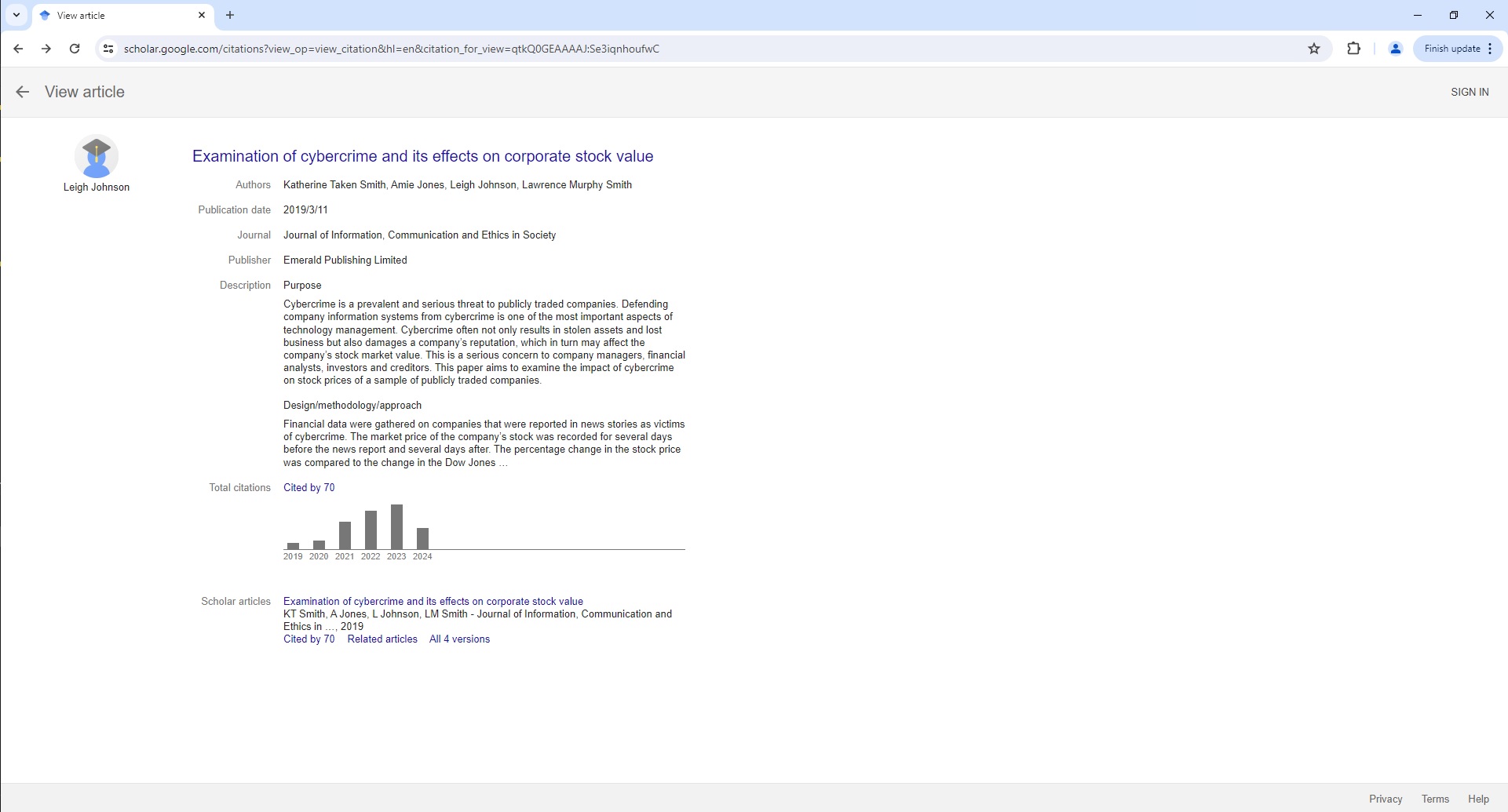
Google Scholar Article Page Parser
To use the Parser API without the ScrapeOps Proxy Aggregator, you first need to retrieve the HTML of the page you want to extract the data from.
For example, here we retrieve the HTML from the following Google Scholar Article Page with a very simple GET request:
import requests

response = requests.get('https://scholar.google.com/citations?view_op=view_citation&hl=en&citation_for_view=qtkQ0GEAAAAJ:Se3iqnhoufwC')

if response.status_code == 200:
    html = response.text
    print(html)
Next, we send this HTML to the ScrapeOps Parser API for data extraction using a POST request:
import requests

response = requests.get('https://scholar.google.com/citations?view_op=view_citation&hl=en&citation_for_view=qtkQ0GEAAAAJ:Se3iqnhoufwC')

if response.status_code == 200:
    html = response.text

    data = {
        'url': 'https://scholar.google.com/citations?view_op=view_citation&hl=en&citation_for_view=qtkQ0GEAAAAJ:Se3iqnhoufwC',
        'html': html,
    }

    response = requests.post(
        url='https://parser.scrapeops.io/v2/google',
        params={'api_key': 'YOUR_API_KEY'},
        json=data
    )

    print(response.json())
The API will return a JSON response with the following data (status, data, url):
{
	"data": {
		"article": {
			"authors": "Katherine Taken Smith, Amie Jones, Leigh Johnson, Lawrence Murphy Smith",
			"description": "Purpose Cybercrime is a prevalent and serious threat to publicly traded companies. Defending company information systems from cybercrime is one of the most important aspects of technology management. Cybercrime often not only results in stolen assets and lost business but also damages a company’s reputation, which in turn may affect the company’s stock market value. This is a serious concern to company managers, financial analysts, investors and creditors. This paper aims to examine the impact of cybercrime on stock prices of a sample of publicly traded companies. Design/methodology/approach Financial data were gathered on companies that were reported in news stories as victims of cybercrime. The market price of the company’s stock was recorded for several days before the news report and several days after. The percentage change in the stock price was compared to the change in the Dow Jones …",
			"journal": "Journal of Information, Communication and Ethics in Society",
			"publication_date": "2019/3/11",
			"publisher": "Emerald Publishing Limited",
			"scholar_articles": [
				{
					"links": [
						{
							"text": "Cited by 70",
							"url": "https://scholar.google.com/scholar?oi=bibs&hl=en&cites=602684519253458120&as_sdt=5"
						},
						{
							"text": "Related articles",
							"url": "https://scholar.google.com/scholar?oi=bibs&hl=en&q=related:yLy6iWAqXQgJ:scholar.google.com/"
						},
						{
							"text": "All 4 versions",
							"url": "https://scholar.google.com/scholar?oi=bibs&hl=en&cluster=602684519253458120"
						}
					],
					"snippet": "KT Smith, A Jones, L Johnson, LM Smith - Journal of Information, Communication and Ethics in …, 2019",
					"title": "Examination of cybercrime and its effects on corporate stock value",
					"url": "https://scholar.google.com/scholar?oi=bibs&cluster=602684519253458120&btnI=1&hl=en"
				}
			],
			"total_citations": {
				"count": 70,
				"histories": [
					{
						"count": 3,
						"url": "https://scholar.google.com/scholar?oi=bibs&hl=en&cites=602684519253458120&as_sdt=5&as_ylo=2019&as_yhi=2019",
						"year": "2019"
					},
					{
						"count": 4,
						"url": "https://scholar.google.com/scholar?oi=bibs&hl=en&cites=602684519253458120&as_sdt=5&as_ylo=2020&as_yhi=2020",
						"year": "2020"
					}
					...
				],
				"text": "Cited by 70",
				"url": "https://scholar.google.com/scholar?oi=bibs&hl=en&cites=602684519253458120&as_sdt=5"
			}
		},
		"author": {
			"image": "https://scholar.google.com/citations/images/avatar_scholar_56.png",
			"name": "Leigh Johnson",
			"url": "https://scholar.google.com/citations?user=qtkQ0GEAAAAJ&hl=en"
		},
		"title": "Examination of cybercrime and its effects on corporate stock value",
		"url": "https://www.emerald.com/insight/content/doi/10.1108/JICES-02-2018-0010/full/html"
	},
	"status": "parse_successful",
	"url": "https://scholar.google.com/citations?view_op=view_citation&hl=en&citation_for_view=qtkQ0GEAAAAJ:Se3iqnhoufwC"
}
A full example JSON response can be found here.
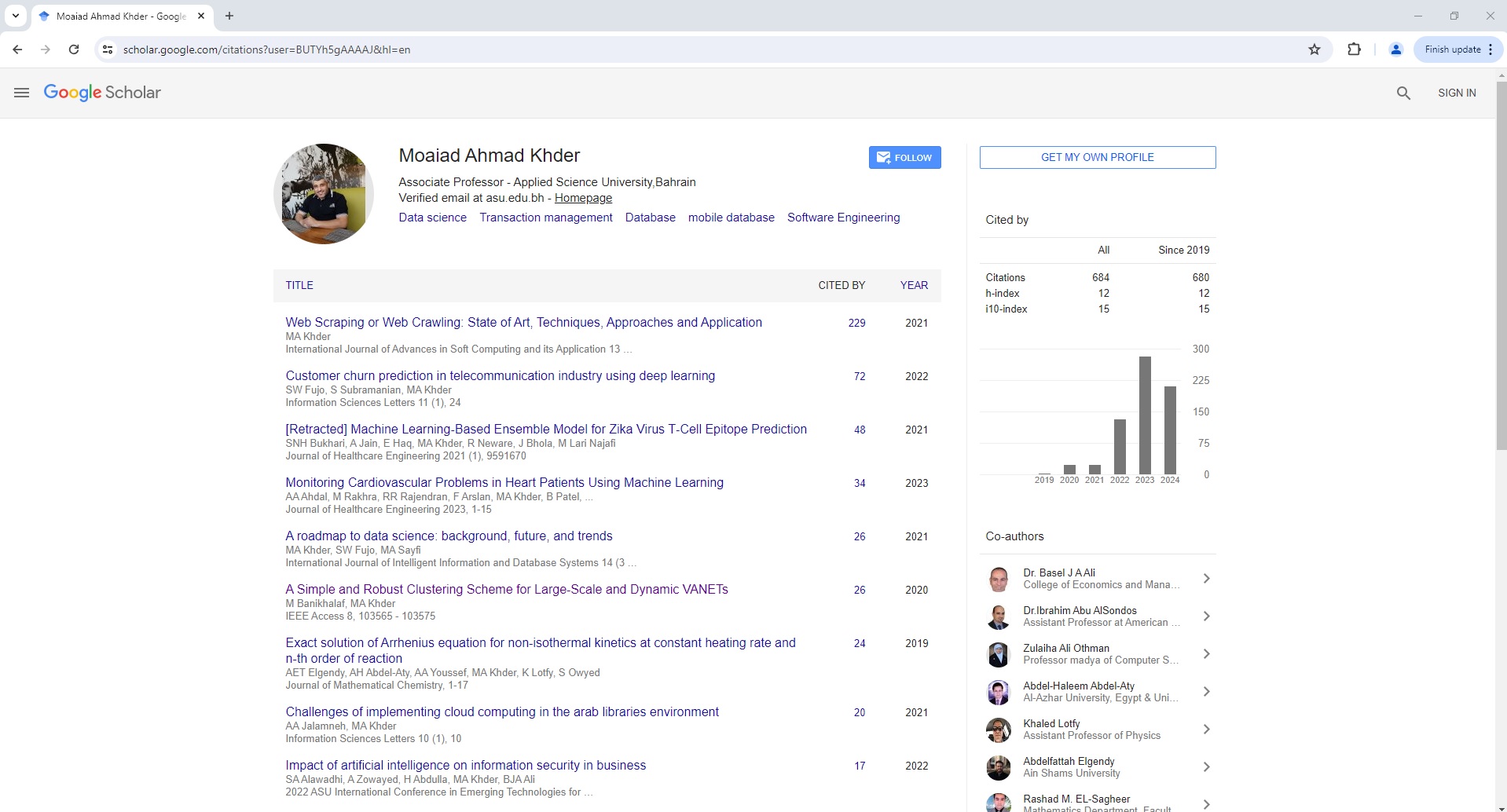
Google Scholar User Page Parser
To use the Parser API without the ScrapeOps Proxy Aggregator, you first need to retrieve the HTML of the page you want to extract the data from.
For example, here we retrieve the HTML from the following Google Scholar User Page with a very simple GET request:
import requests

response = requests.get('https://scholar.google.com/citations?user=BUTYh5gAAAAJ&hl=en')

if response.status_code == 200:
    html = response.text
    print(html)
Next, we send this HTML to the ScrapeOps Parser API for data extraction using a POST request:
import requests

response = requests.get('https://scholar.google.com/citations?user=BUTYh5gAAAAJ&hl=en')

if response.status_code == 200:
    html = response.text

    data = {
        'url': 'https://scholar.google.com/citations?user=BUTYh5gAAAAJ&hl=en',
        'html': html,
    }

    response = requests.post(
        url='https://parser.scrapeops.io/v2/google',
        params={'api_key': 'YOUR_API_KEY'},
        json=data
    )

    print(response.json())
The API will return a JSON response with the following data (status, data, url):
{
	"data": {
		"citations": {
			"histories": [
				{
					"count": 2,
					"year": "2019"
				},
				{
					"count": 24,
					"year": "2020"
				}
				...
			],
			"statistics": {
				"citations": {
					"all": 684,
					"since_2019": 680
				},
				"h-index": {
					"all": 12,
					"since_2019": 12
				},
				"i10-index": {
					"all": 15,
					"since_2019": 15
				}
			}
		},
		"co_authors": [
			{
				"image": "https://scholar.google.com/scholar/images/cleardot.gif",
				"name": "Dr. Basel J A Ali",
				"organization": "College of Economics and Management (CoEM), Al Qasimia University, Sharjah, United Arab Emirates",
				"url": "https://scholar.google.com/citations?user=UJAGyBEAAAAJ&hl=en",
				"verified_email_at": "alqasimia.ac.ae"
			},
			{
				"image": "https://scholar.google.com/scholar/images/cleardot.gif",
				"name": "Dr.Ibrahim Abu AlSondos",
				"organization": "Assistant Professor at American University in the Emirates (AUE), Dubai",
				"url": "https://scholar.google.com/citations?user=iaL7hFkAAAAJ&hl=en",
				"verified_email_at": "aue.ae"
			}
			...
		],
		"profile": {
			"affiliation": "Associate Professor - Applied Science University,Bahrain",
			"interests": [
				{
					"field": "Data science",
					"url": "https://scholar.google.com/citations?view_op=search_authors&hl=en&mauthors=label:data_science"
				},
				{
					"field": "Transaction management",
					"url": "https://scholar.google.com/citations?view_op=search_authors&hl=en&mauthors=label:transaction_management"
				}
				...
			],
			"name": "Moaiad Ahmad Khder",
			"verified_email_at": "asu.edu.bh"
		},
		"publications": [
			{
				"authors": "MA Khder",
				"cited_by": {
					"count": 229,
					"url": "https://scholar.google.com/scholar?oi=bibs&hl=en&cites=7148673095289091519"
				},
				"more": "International Journal of Advances in Soft Computing and its Application 13 …, 2021",
				"title": "Web Scraping or Web Crawling: State of Art, Techniques, Approaches and Application",
				"url": "https://scholar.google.com/citations?view_op=view_citation&hl=en&user=BUTYh5gAAAAJ&citation_for_view=BUTYh5gAAAAJ:_kc_bZDykSQC",
				"year": "2021"
			},
			{
				"authors": "SW Fujo, S Subramanian, MA Khder",
				"cited_by": {
					"count": 72,
					"url": "https://scholar.google.com/scholar?oi=bibs&hl=en&cites=8951072602052083546"
				},
				"more": "Information Sciences Letters 11 (1), 24, 2022",
				"title": "Customer churn prediction in telecommunication industry using deep learning",
				"url": "https://scholar.google.com/citations?view_op=view_citation&hl=en&user=BUTYh5gAAAAJ&citation_for_view=BUTYh5gAAAAJ:hFOr9nPyWt4C",
				"year": "2022"
			}
			...
		]
	},
	"status": "parse_successful",
	"url": "https://scholar.google.com/citations?user=BUTYh5gAAAAJ&hl=en"
}
A full example JSON response can be found here.
Proxy API Integration
The ScrapeOps Parser API is integrated into the ScrapeOps Proxy API Aggregator and can be used for free by using the Auto Extract functionality.
So if you already have a Proxy API Aggregator plan then use the Parser API for no extra charge.
The following example shows you how to use the Parser API via a Python Requests based scraper using the Proxy API Aggregator:
import requests

response = requests.get(
  url='https://proxy.scrapeops.io/v1/',
  params={
      'api_key': 'YOUR_API_KEY',
      'url': 'https://scholar.google.com/citations?view_op=view_citation&hl=en&citation_for_view=qtkQ0GEAAAAJ:Se3iqnhoufwC',
      'auto_extract': 'google'
  }
)

print(response.json())