Google Maps Parser
Using the ScrapeOps Parser API you can scrape Google Maps Pages without having to maintain your own product parsers.
Simply send the HTML of the Google Maps Pages to the Parser API endpoint, and receive the data in structured JSON format.
Google Maps Parser API Endpoint:
"https://parser.scrapeops.io/v2/google"
The Google Maps Parser supports the following page types:
Authorisation - API Key
To use the ScrapeOps Parser API, you first need an API key which you can get by signing up for a free account here.
Your API key must be included with every request using the api_key query parameter otherwise the API will return a 403 Forbidden Access status code.
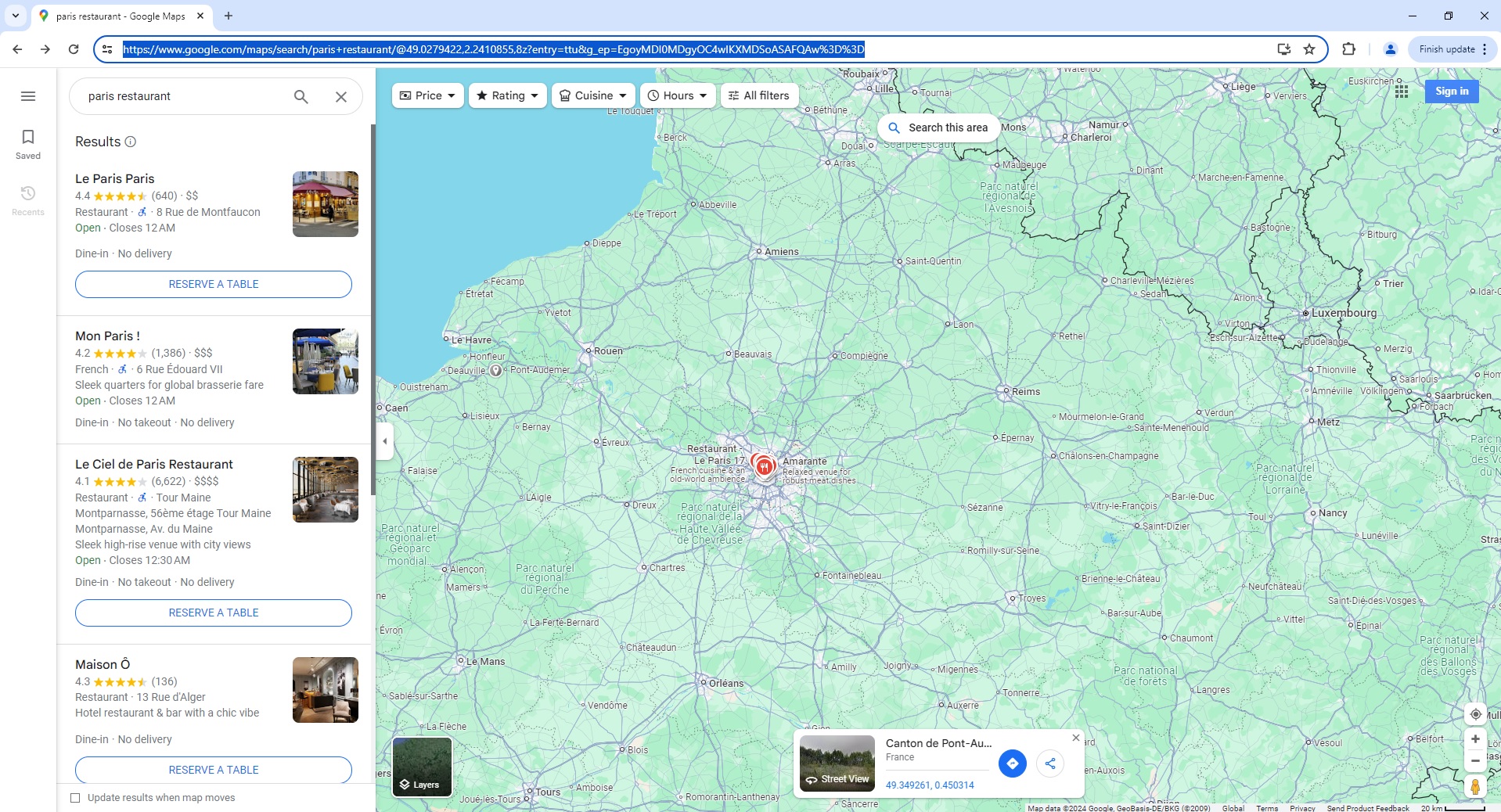
Google Maps Search Page Parser
To use the Parser API without the ScrapeOps Proxy Aggregator, you first need to retrieve the HTML of the page you want to extract the data from.
For example, here we retrieve the HTML from the following Google Maps Search Page with a very simple GET request:
import requests

response = requests.get('https://www.google.com/maps/search/paris+restaurant/@49.0279422,2.2410855,8.5z?entry=ttu&g_ep=EgoyMDI0MDgyNi4wIKXMDSoASAFQAw%3D%3D')

if response.status_code == 200:
    html = response.text
    print(html)
Next, we send this HTML to the ScrapeOps Parser API for data extraction using a POST request:
import requests

response = requests.get('https://www.google.com/maps/search/paris+restaurant/@49.0279422,2.2410855,8.5z?entry=ttu&g_ep=EgoyMDI0MDgyNi4wIKXMDSoASAFQAw%3D%3D')

if response.status_code == 200:
    html = response.text

    data = {
        'url': 'https://www.google.com/maps/search/paris+restaurant/@49.0279422,2.2410855,8.5z?entry=ttu&g_ep=EgoyMDI0MDgyNi4wIKXMDSoASAFQAw%3D%3D',
        'html': html,
        'render_js': 'true'
    }

    response = requests.post(
        url='https://parser.scrapeops.io/v2/google',
        params={'api_key': 'YOUR_API_KEY'},
        json=data
    )

    print(response.json())
The API will return a JSON response with the following data (status, data, url):
{
"data": {
"search_information": {
"filters": [
"Price",
"Rating",
"Cuisine",
"Hours"
],
"latitude": "49.0279422",
"longitude": "2.2410855",
"query": "paris restaurant"
},
"search_results": [
{
"actions": [
{
"link": "https://www.google.com/maps/reserve/v/dine/c/4BXicj9XP0k?source=pa&opi=79508299&hl=en&gei=6TTTZsTGK-qP2roP9YfGsQg&sourceurl=http://www.google.com/service/MapsSearchService/Search?authuser%3D0%26hl%3Den%26q%3Dparis%2Brestaurant%26tbm%3Dmap",
"text": "Reserve a table"
}
],
"extra": [
"Dine-in",
"No delivery"
],
"features": [
"Restaurant · · 8 Rue de Montfaucon",
"Open ⋅ Closes 12 AM"
],
"image": "https://lh5.googleusercontent.com/p/AF1QipODTOOP3uf1QAcF0MQD7j1clmha8EYu0GOEt62i=w204-h92-k-no",
"link": "https://www.google.com/maps/place/Le+Paris+Paris/data=!4m7!3m6!1s0x47e671bd225fbaef:0xa832ad034694bbcc!8m2!3d48.852579!4d2.3357251!16s%2Fg%2F11rckz8ppp!19sChIJ77pfIr1x5kcRzLuURgOtMqg?authuser=0&hl=en&rclk=1",
"name": "Le Paris Paris",
"rating": 4.4,
"review_count": 640
},
{
"extra": [
"Dine-in",
"No takeout",
"No delivery"
],
"features": [
"French · · 6 Rue Édouard VII",
"Sleek quarters for global brasserie fare",
"Open ⋅ Closes 12 AM"
],
"image": "https://lh5.googleusercontent.com/p/AF1QipM539MfZjD-W9GR5_MT0od-ZhoFCzqo530Cs0ug=w122-h92-k-no",
"link": "https://www.google.com/maps/place/Mon+Paris+!/data=!4m7!3m6!1s0x47e66e31504516cb:0x7bb0c3587b2ceb42!8m2!3d48.8710493!4d2.3294214!16s%2Fg%2F11ckr_n5qv!19sChIJyxZFUDFu5kcRQusse1jDsHs?authuser=0&hl=en&rclk=1",
"name": "Mon Paris !",
"rating": 4.2,
"review_count": 1386
}
...
]
},
"status": "parse_successful",
"url": "https://www.google.com/maps/search/paris+restaurant/@49.0279422,2.2410855,8.5z?entry\\x3dttu\\x26g_ep\\x3dEgoyMDI0MDgyNi4wIKXMDSoASAFQAw%3D%3D\\x26dg\\x3des5"
}
A full example JSON response can be found here.
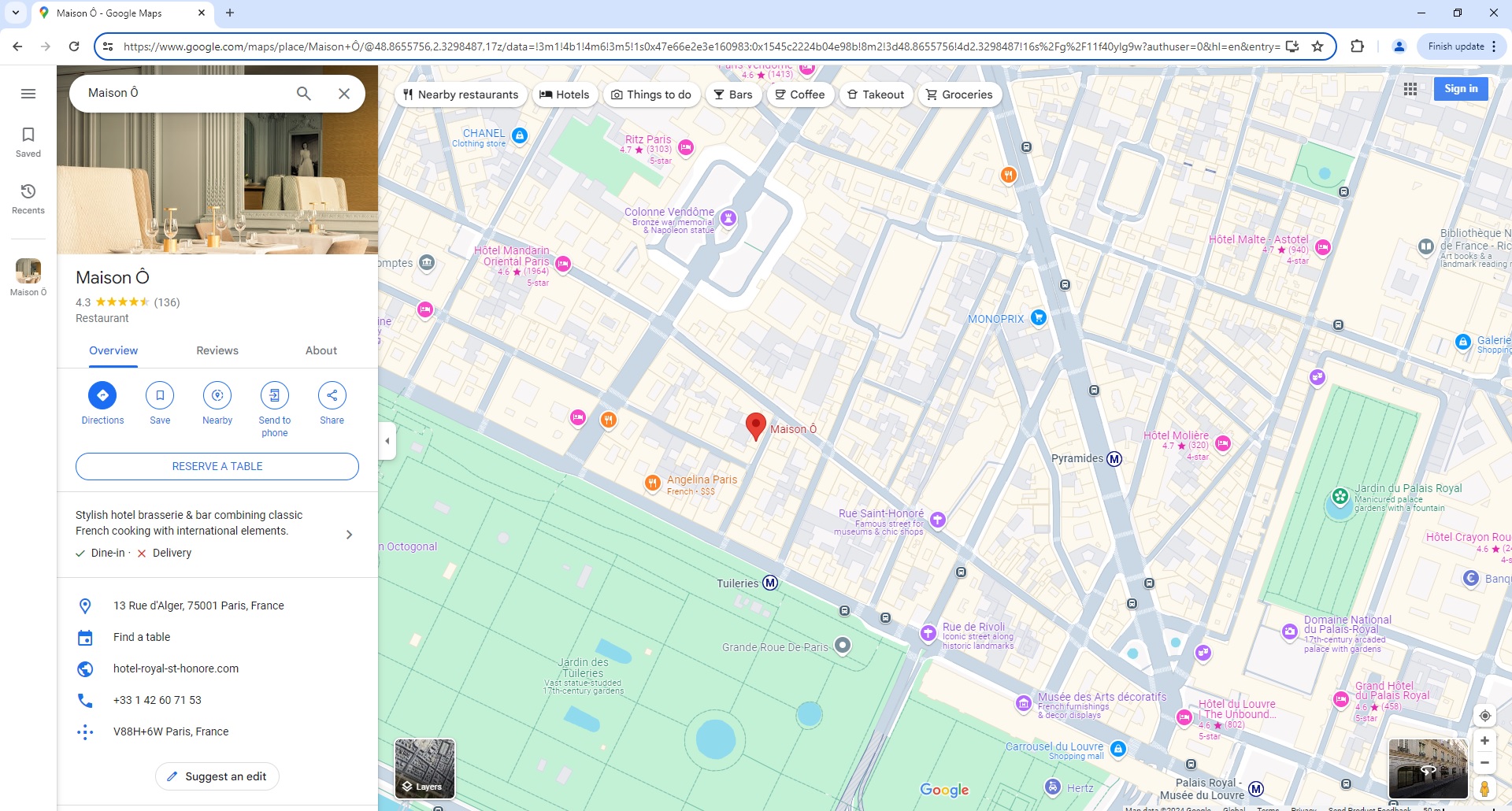
Google Maps Place Page Parser
To use the Parser API without the ScrapeOps Proxy Aggregator, you first need to retrieve the HTML of the page you want to extract the data from.
For example, here we retrieve the HTML from the following Google Maps Place Page with a very simple GET request:
import requests

response = requests.get('https://www.google.com/maps/place/Maison+%C3%94/@48.8655756,2.3298487,17z/data=!3m1!4b1!4m6!3m5!1s0x47e66e2e3e160983:0x1545c2224b04e98b!8m2!3d48.8655756!4d2.3298487!16s%2Fg%2F11f40ylg9w?authuser=0&hl=en&entry=ttu&g_ep=EgoyMDI0MDgyNi4wIKXMDSoASAFQAw%3D%3D')

if response.status_code == 200:
    html = response.text
    print(html)
Next, we send this HTML to the ScrapeOps Parser API for data extraction using a POST request:
import requests

response = requests.get('https://www.google.com/maps/place/Maison+%C3%94/@48.8655756,2.3298487,17z/data=!3m1!4b1!4m6!3m5!1s0x47e66e2e3e160983:0x1545c2224b04e98b!8m2!3d48.8655756!4d2.3298487!16s%2Fg%2F11f40ylg9w?authuser=0&hl=en&entry=ttu&g_ep=EgoyMDI0MDgyNi4wIKXMDSoASAFQAw%3D%3D')

if response.status_code == 200:
    html = response.text

    data = {
        'url': 'https://www.google.com/maps/place/Maison+%C3%94/@48.8655756,2.3298487,17z/data=!3m1!4b1!4m6!3m5!1s0x47e66e2e3e160983:0x1545c2224b04e98b!8m2!3d48.8655756!4d2.3298487!16s%2Fg%2F11f40ylg9w?authuser=0&hl=en&entry=ttu&g_ep=EgoyMDI0MDgyNi4wIKXMDSoASAFQAw%3D%3D',
        'html': html,
    }

    response = requests.post(
        url='https://parser.scrapeops.io/v2/google',
        params={'api_key': 'YOUR_API_KEY'},
        json=data
    )

    print(response.json())
The API will return a JSON response with the following data (status, data, url):
{
	"data": {
		"place_information": {
			"category": "Restaurant",
			"image": "https://lh5.googleusercontent.com/p/AF1QipNXca7DNOZJSE8z7q8uIZkSxz8LvuaeesRx86iw=w408-h510-k-no",
			"name": "Maison Ô",
			"overview": {
				"address": "13 Rue d'Alger, 75001 Paris, France",
				"phone": "+33 1 42 60 71 53",
				"plus_code": "V88H+6W Paris, France",
				"website": "https://www.hotel-royal-st-honore.com/fr/restaurant.html"
			},
			"photos": [
				{
					"image": "https://lh5.googleusercontent.com/p/AF1QipNXca7DNOZJSE8z7q8uIZkSxz8LvuaeesRx86iw=w238-h298-k-no",
					"text": "All"
				},
				{
					"image": "https://lh5.googleusercontent.com/p/AF1QipNYuzOLiQw6a9oWT0D5jcuDm1MqsbkFQdumge2s=w224-h298-k-no",
					"text": "Menu"
				}
				...
			],
			"rating_average": 4.3,
			"related_places": [
				{
					"category": "French",
					"image": "https://lh5.googleusercontent.com/p/AF1QipMlx41R-RTxg-M2rkvthrhd2UOpiwMvhnBloE7k=w156-h114-p-k-no",
					"name": "Restaurant Maison 28",
					"rating": 4.4,
					"reviews": 155
				},
				{
					"category": "Restaurant",
					"image": "https://lh5.googleusercontent.com/p/AF1QipMfYrHACJVurvr2qmQ0X_fcHgmQmjiRFKcuDbax=w156-h114-p-k-no",
					"name": "Maison Maison",
					"rating": 4.2,
					"reviews": 1205
				}
				...
			],
			"review_summary": {
				"1_star_percent": 13,
				"1_star_reviews": 11,
				"2_star_percent": 3,
				"2_star_reviews": 3,
				"3_star_percent": 10,
				"3_star_reviews": 9,
				"4_star_percent": 37,
				"4_star_reviews": 31,
				"5_star_percent": 100,
				"5_star_reviews": 82,
				"average_rating": 4.3,
				"total_reviews": 136
			},
			"reviews": [
				{
					"author": {
						"image": "https://lh3.googleusercontent.com/a/ACg8ocIzbhe2GPtYGDmRyOP6ted0ohRb5wCPZ3Ak2MNvvV9C7l3jQz8=w36-h36-p-rp-mo-br100",
						"name": "Marc-Andrea Levy",
						"summary": "17 reviews · 24 photos"
					},
					"date": "3 months ago",
					"photos": [
						"https://lh5.googleusercontent.com/p/AF1QipNi6vUXPUeXJs8UKvNX6WNAIiyZaAQsfmLAVr32=w600-h450-p-k-no"
					],
					"rating": 5,
					"text": "A great hidden gem, the new menu is full of great dishes; The Aile de Raie, Caesar salad or the pork chop are some of the dishes we ate which were superb. Wine selection is well curated and the atmosphere we had in the evening was very cosy and romantic."
				},
				{
					"author": {
						"image": "https://lh3.googleusercontent.com/a/ACg8ocI1NFGU9sVZ2PGlvsAVRUsWg9Wy7XQVnsQJ4JyRoP5OyoWlqB8=w36-h36-p-rp-mo-ba4-br100",
						"name": "M P",
						"summary": "Local Guide · 126 reviews · 166 photos"
					},
					"date": "2 years ago",
					"likes": 1,
					"photos": [
						"https://lh5.googleusercontent.com/p/AF1QipNCMFvF5rJ5ph_E8hGCm-UtVW2jrsGBlO3t2yqk=w300-h225-p-k-no",
						"https://lh5.googleusercontent.com/p/AF1QipNqMKKrpt9LW8TnGDTelpvnnVF2plMvhboTQQTR=w300-h225-p-k-no",
						"https://lh5.googleusercontent.com/p/AF1QipNUH2ROmDdd3Fk7IdManoOU5Gt9ijkq4fSgZ90m=w300-h225-p-k-no",
						"https://lh5.googleusercontent.com/p/AF1QipOrPcTgpd8eNDDfa_OC8VBEIcK5mqS7cMFF2Ijk=w300-h225-p-k-no"
					],
					"rating": 5,
					"text": "such a lovely place with very cozy and elegant ambiance, the staff were really friendly and attentive to their guests, the food was exquisite! I had the roasted duck as main course and I must say that this was the best one I had so far! …"
				}
				...
			],
			"reviews_count": 136
		}
	},
	"status": "parse_successful",
	"url": "https://www.google.com/maps/place/Maison+%C3%94/@48.8655756,2.3298487,17z/data\\x3d!3m1!4b1!4m6!3m5!1s0x47e66e2e3e160983:0x1545c2224b04e98b!8m2!3d48.8655756!4d2.3298487!16s%2Fg%2F11f40ylg9w?authuser\\x3d0\\x26hl\\x3den\\x26entry\\x3dttu\\x26g_ep\\x3dEgoyMDI0MDgyNi4wIKXMDSoASAFQAw%3D%3D\\x26dg\\x3des5"
}
A full example JSON response can be found here.
Proxy API Integration
The ScrapeOps Parser API is integrated into the ScrapeOps Proxy API Aggregator and can be used for free by using the Auto Extract functionality.
So if you already have a Proxy API Aggregator plan then use the Parser API for no extra charge.
The following example shows you how to use the Parser API via a Python Requests based scraper using the Proxy API Aggregator:
import requests

response = requests.get(
  url='https://proxy.scrapeops.io/v1/',
  params={
      'api_key': 'YOUR_API_KEY',
      'url': 'https://www.google.com/maps/place/Maison+%C3%94/@48.8655756,2.3298487,17z/data=!3m1!4b1!4m6!3m5!1s0x47e66e2e3e160983:0x1545c2224b04e98b!8m2!3d48.8655756!4d2.3298487!16s%2Fg%2F11f40ylg9w?authuser=0&hl=en&entry=ttu&g_ep=EgoyMDI0MDgyNi4wIKXMDSoASAFQAw%3D%3D',
      'auto_extract': 'google'
  }
)

print(response.json())