 ScrapeOps
How to Scrape Linkedin Profiles With Selenium
 Selenium Web Scraping Playbook12 min read
Founded in 2003, LinkedIn is a huge social network for professionals with over 20 years of major adoption. LinkedIn hosts a wealth of data from profiles to job postings and much more. LinkedIn's profiles can be very difficult to scrape, but if you know what to do, you can get past their seemingly unbeatable system of redirects.
In today's guide, we're going to explore the task of scraping LinkedIn profiles.
TLDR - How to Scrape LinkedIn Profiles
If you don't have time to read, we've got a pre-built scraper for you right here.
First, it performs a crawl and generates a report based on the search results. After the crawler generates its report, it runs a scraping function that pulls data from each profile discovered during the crawl.
- Start by creating a new project folder with a
config.jsonfile. - Inside your config file, add your ScrapeOps API key,
{"api_key": "your-super-secret-api-key"}. - Then, copy and paste the code below into a Python file.
import osimport csvimport jsonimport loggingfrom urllib.parse import urlencodefrom selenium import webdriverfrom selenium.webdriver.common.by import Byimport concurrent.futuresfrom dataclasses import dataclass, field, fields, asdict
API_KEY = ""
with open("config.json", "r") as config_file:    config = json.load(config_file)    API_KEY = config["api_key"]
options = webdriver.ChromeOptions()options.add_argument("--headless")options.add_argument("--disable-javascript")
def get_scrapeops_url(url, location="us"):    payload = {        "api_key": API_KEY,        "url": url,        "country": location,        }    proxy_url = "https://proxy.scrapeops.io/v1/?" + urlencode(payload)    return proxy_url

## Logginglogging.basicConfig(level=logging.INFO)logger = logging.getLogger(__name__)


@dataclassclass SearchData:    name: str = ""    display_name: str = ""    url: str = ""    location: str = ""    companies: str = ""
    def __post_init__(self):        self.check_string_fields()            def check_string_fields(self):        for field in fields(self):            # Check string fields            if isinstance(getattr(self, field.name), str):                # If empty set default text                if getattr(self, field.name) == "":                    setattr(self, field.name, f"No {field.name}")                    continue                # Strip any trailing spaces, etc.                value = getattr(self, field.name)                setattr(self, field.name, value.strip())
@dataclassclass ProfileData:    name: str = ""    company: str = ""    company_profile: str = ""    job_title: str = ""    followers: int = 0


    def __post_init__(self):        self.check_string_fields()            def check_string_fields(self):        for field in fields(self):            # Check string fields            if isinstance(getattr(self, field.name), str):                # If empty set default text                if getattr(self, field.name) == "":                    setattr(self, field.name, f"No {field.name}")                    continue                # Strip any trailing spaces, etc.                value = getattr(self, field.name)                setattr(self, field.name, value.strip())

class DataPipeline:        def __init__(self, csv_filename="", storage_queue_limit=50):        self.names_seen = []        self.storage_queue = []        self.storage_queue_limit = storage_queue_limit        self.csv_filename = csv_filename        self.csv_file_open = False        def save_to_csv(self):        self.csv_file_open = True        data_to_save = []        data_to_save.extend(self.storage_queue)        self.storage_queue.clear()        if not data_to_save:            return
        keys = [field.name for field in fields(data_to_save[0])]        file_exists = os.path.isfile(self.csv_filename) and os.path.getsize(self.csv_filename) > 0        with open(self.csv_filename, mode="a", newline="", encoding="utf-8") as output_file:            writer = csv.DictWriter(output_file, fieldnames=keys)
            if not file_exists:                writer.writeheader()
            for item in data_to_save:                writer.writerow(asdict(item))
        self.csv_file_open = False                        def is_duplicate(self, input_data):        if input_data.name in self.names_seen:            logger.warning(f"Duplicate item found: {input_data.name}. Item dropped.")            return True        self.names_seen.append(input_data.name)        return False                def add_data(self, scraped_data):        if self.is_duplicate(scraped_data) == False:            self.storage_queue.append(scraped_data)            if len(self.storage_queue) >= self.storage_queue_limit and self.csv_file_open == False:                self.save_to_csv()                           def close_pipeline(self):        if self.csv_file_open:            time.sleep(3)        if len(self.storage_queue) > 0:            self.save_to_csv()


def crawl_profiles(name, location, data_pipeline=None, retries=3):    first_name = name.split()[0]    last_name = name.split()[1]    url = f"https://www.linkedin.com/pub/dir?firstName={first_name}&lastName={last_name}&trk=people-guest_people-search-bar_search-submit"    tries = 0    success = False        while tries <= retries and not success:
        driver = webdriver.Chrome(options=options)
        try:            scrapeops_proxy_url = get_scrapeops_url(url, location=location)            driver.get(scrapeops_proxy_url)                            profile_cards = driver.find_elements(By.CSS_SELECTOR, "div[class='base-search-card__info']")            for card in profile_cards:                parent = card.find_element(By.XPATH, "..")                href = parent.get_attribute("href").split("?")[0]                name = href.split("/")[-1].split("?")[0]                display_name = card.find_element(By.CSS_SELECTOR,"h3[class='base-search-card__title']").text                location = card.find_element(By.CSS_SELECTOR, "p[class='people-search-card__location']").text                companies = "n/a"                has_companies = card.find_elements(By.CSS_SELECTOR, "span[class='entity-list-meta__entities-list']")                if has_companies:                    companies = has_companies[0].text
                search_data = SearchData(                    name=name,                    display_name=display_name,                    url=href,                    location=location,                    companies=companies                )                            data_pipeline.add_data(search_data)            logger.info(f"Successfully parsed data from: {url}")            success = True                                    except Exception as e:            logger.error(f"An error occurred while processing page {url}: {e}")            logger.info(f"Retrying request for page: {url}, retries left {retries-tries}")            tries+=1                finally:            driver.quit()
    if not success:        raise Exception(f"Max Retries exceeded: {retries}")

def start_crawl(profile_list, location, data_pipeline=None, max_threads=5, retries=3):    with concurrent.futures.ThreadPoolExecutor(max_workers=max_threads) as executor:        executor.map(            crawl_profiles,            profile_list,            [location] * len(profile_list),            [data_pipeline] * len(profile_list),            [retries] * len(profile_list)        )

def scrape_profile(row, location, retries=3):    url = row["url"]    tries = 0    success = False
    while tries <= retries and not success:
        driver = webdriver.Chrome(options=options)
        try:            driver.get(get_scrapeops_url(url))            head = driver.find_element(By.CSS_SELECTOR, "head")            script = head.find_element(By.CSS_SELECTOR, "script[type='application/ld+json']")            json_data_graph = json.loads(script.get_attribute("innerHTML"))["@graph"]            json_data = {}            person_pipeline = DataPipeline(f"{row['name']}.csv")            for element in json_data_graph:                if element["@type"] == "Person":                    json_data = element                    break
            company = "n/a"            company_profile = "n/a"            job_title = "n/a"                        if "jobTitle" in json_data.keys() and type(json_data["jobTitle"] == list) and len(json_data["jobTitle"]) > 0:                job_title = json_data["jobTitle"][0]                        has_company = "worksFor" in json_data.keys() and len(json_data["worksFor"]) > 0            if has_company:                company = json_data["worksFor"][0]["name"]                has_company_url = "url" in json_data["worksFor"][0].keys()                if has_company_url:                    company_profile = json_data["worksFor"][0]["url"]                        has_interactions = "interactionStatistic" in json_data.keys()            followers = 0            if has_interactions:                stats = json_data["interactionStatistic"]                if stats["name"] == "Follows" and stats["@type"] == "InteractionCounter":                    followers = stats["userInteractionCount"]                        profile_data = ProfileData (                name=row["name"],                company=company,                company_profile=company_profile,                job_title=job_title,                followers=followers            )            person_pipeline.add_data(profile_data)                   person_pipeline.close_pipeline()            success = True                        except Exception as e:            logger.error(f"Exception thrown: {e}")            logger.warning(f"Failed to process page: {row['url']}, retries left: {retries-tries}")            tries += 1
        finally:            driver.quit()
    if not success:        raise Exception(f"Max Retries exceeded: {retries}")
    else:        logger.info(f"Successfully parsed: {row['url']}")

def process_results(csv_file, location, max_threads=5, retries=3):    logger.info(f"processing {csv_file}")    with open(csv_file, newline="") as file:        reader = list(csv.DictReader(file))
        with concurrent.futures.ThreadPoolExecutor(max_workers=max_threads) as executor:            executor.map(                scrape_profile,                reader,                [location] * len(reader),                [retries] * len(reader)            )
if __name__ == "__main__":
    MAX_RETRIES = 3    MAX_THREADS = 5        LOCATION = "us"
    logger.info(f"Crawl starting...")
    ## INPUT ---> List of keywords to scrape    keyword_list = ["bill gates", "elon musk"]
    ## Job Processes    filename = "profile-crawl.csv"    crawl_pipeline = DataPipeline(csv_filename=filename)    start_crawl(keyword_list, LOCATION, data_pipeline=crawl_pipeline, max_threads=MAX_THREADS, retries=MAX_RETRIES)    crawl_pipeline.close_pipeline()    logger.info(f"Crawl complete.")
    process_results(filename, LOCATION, max_threads=MAX_THREADS, retries=MAX_RETRIES)
To change your results, you can change any of the following from our main:
MAX_RETRIES: Defines the maximum number of times the script will attempt to retrieve a webpage if the initial request fails (e.g., due to network issues or rate limiting).MAX_THREADS: Sets the maximum number of threads that the script will use concurrently during scraping.PAGES: The number of pages of profiles to scrape for each keyword.LOCATION: The country code or identifier for the region from which profiles should be scraped (e.g., "us" for the United States).keyword_list: A list of keywords representing name surname of people to search for on LinkedIn (e.g., ["Bill Gates"]).
How To Architect Our LinkedIn Profiles Scraper
We're not going to sugarcoat this. LinkedIn is difficult to scrape. From redirects to their own homemade anti-bots, this task can seem impossible those new to scraping.
However, with some due diligence, we can get around all of that. We'll to build a profile crawler and a profile scraper. Our crawler takes in a keyword and searches for it.
For instance, if we want to search for Bill Gates, our crawler will perform that search and save each Bill Gates that it finds in the results.
Then the crawler will save these results to a CSV file. Next, it's time for our profile scraper. The profile scraper picks up where the crawler left off. It reads the CSV and then scrapes each individual profile found in the CSV file.
At a high level, our profile crawler needs to:
- Perform a search and parse the search results.
- Store those parsed results.
- Concurrently run steps 1 and 2 on multiple searches.
- Use proxy integration to get past LinkedIn's anti-bots.
Our profile scraper needs to perform the following steps:
- Read the crawler's report into an array.
- Parse a row from the array.
- Store parsed profile data.
- Run steps 2 and 3 on multiple pages concurrently.
- Utilize a proxy to bypass anti-bots.
Understanding How To Scrape LinkedIn Profiles
Before we write our scraping code, we need to understand exactly how to get our information and how to extract it from the page. We'll use the ScrapeOps Proxy Aggregator API to handle our geolocation.
We'll go through these next few steps in order to plan out how to build our scraper.
Step 1: How To Request LinkedIn Profiles Pages
To start, we need to know how to GET these webpages.
We need to GET, the search results and the individual profile page. Check out the images below for a better understanding of these types of pages.
First is our search results page and afterward you'll see in individual profile page.
Below, you can view a search for Bill Gates. Our URL is:
https://www.linkedin.com/pub/dir?firstName=bill&lastName=gates&trk=people-guest_people-search-bar_search-submitWe're prompted to sign in as soon as we get to the page, but this isn't really an issue because our full page is still intact under the prompt. Our final URL format looks like this:
https://www.linkedin.com/pub/dir?firstName={first_name}&lastName={last_name}&trk=people-guest_people-search-bar_search-submit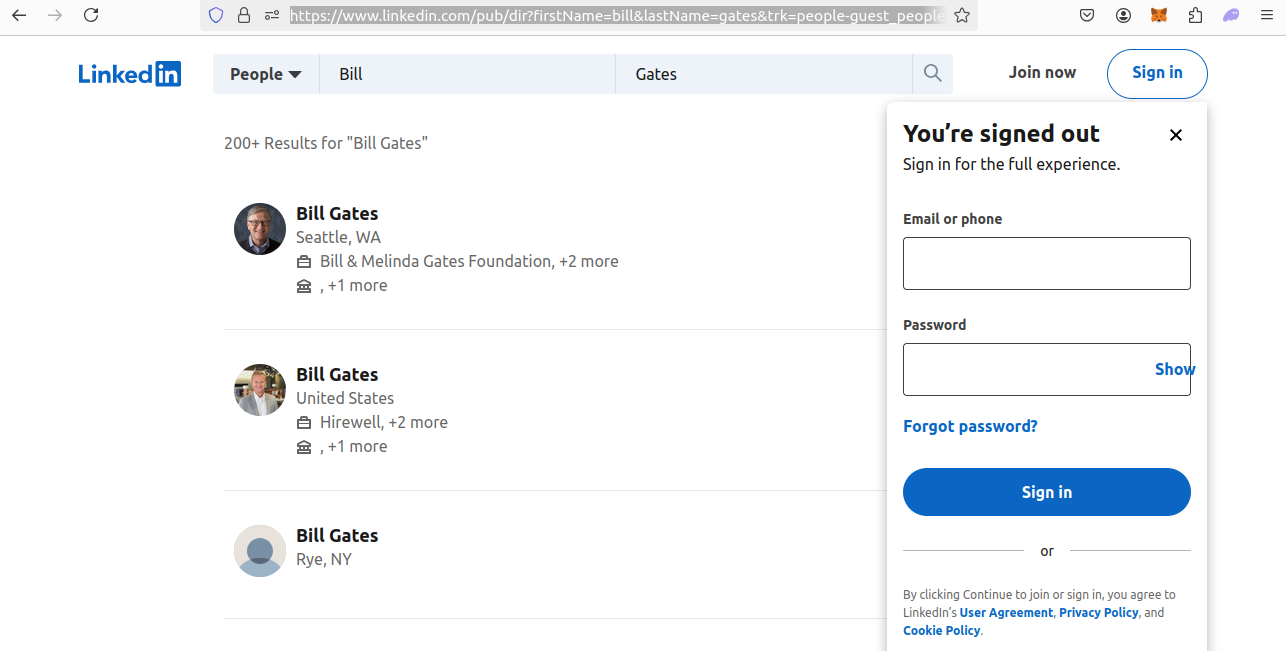 LinkedIn Search Results
We also need to take a close look at the LinkedIn profile layout. Here's a look at the profile of Bill Gates. While we're once again prompted to sign in, the page is intact. Our URL is :
https://www.linkedin.com/in/williamhgates?trk=people-guest_people_search-cardWhen we reconstruct these links, they'll be:
https://www.linkedin.com/in/{name_of_profile}We remove the queries at the end because (for some reason), anti-bots are less likely to block us when we format the URL this way.
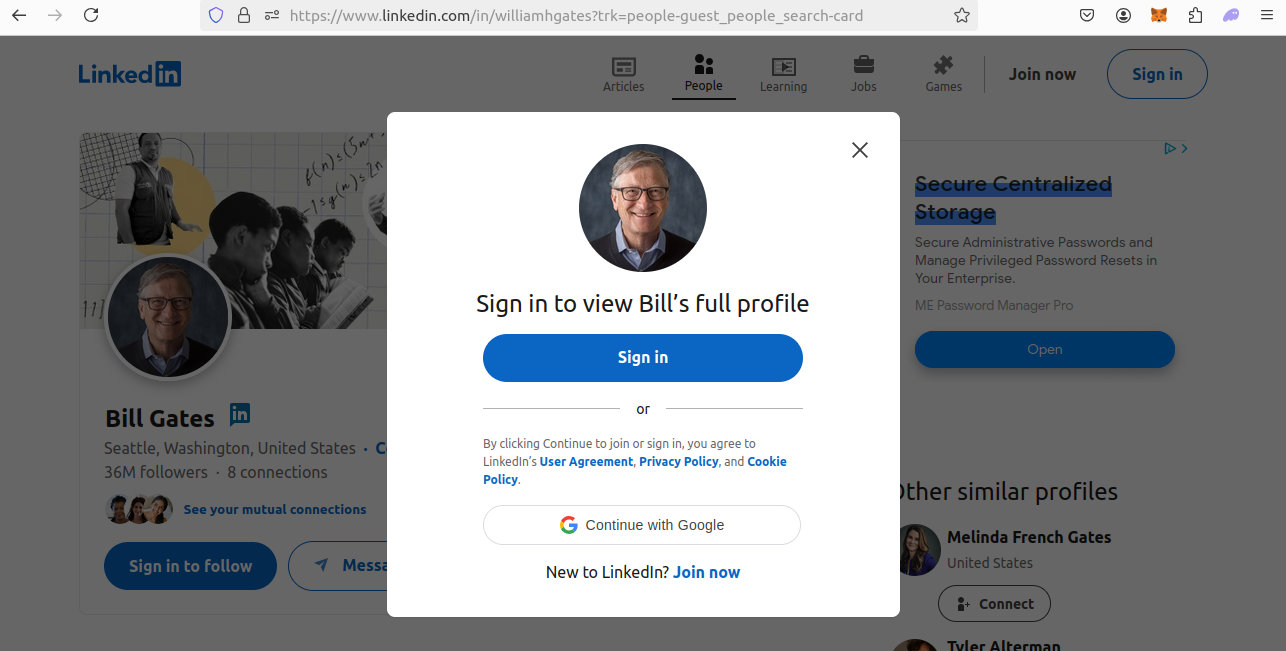 Bill Gates LinkedIn Profile
Step 2: How To Extract Data From LinkedIn Profiles Results and Pages
We need a better understanding of how to extract the data from these pages
- In our search results, each result is a
divwith aclassof'base-search-card__info'. - For individual profile pages, we get it from a JSON blob inside the
headof the page.
Look at each result. It's div element. Its class is base-search=card__info.
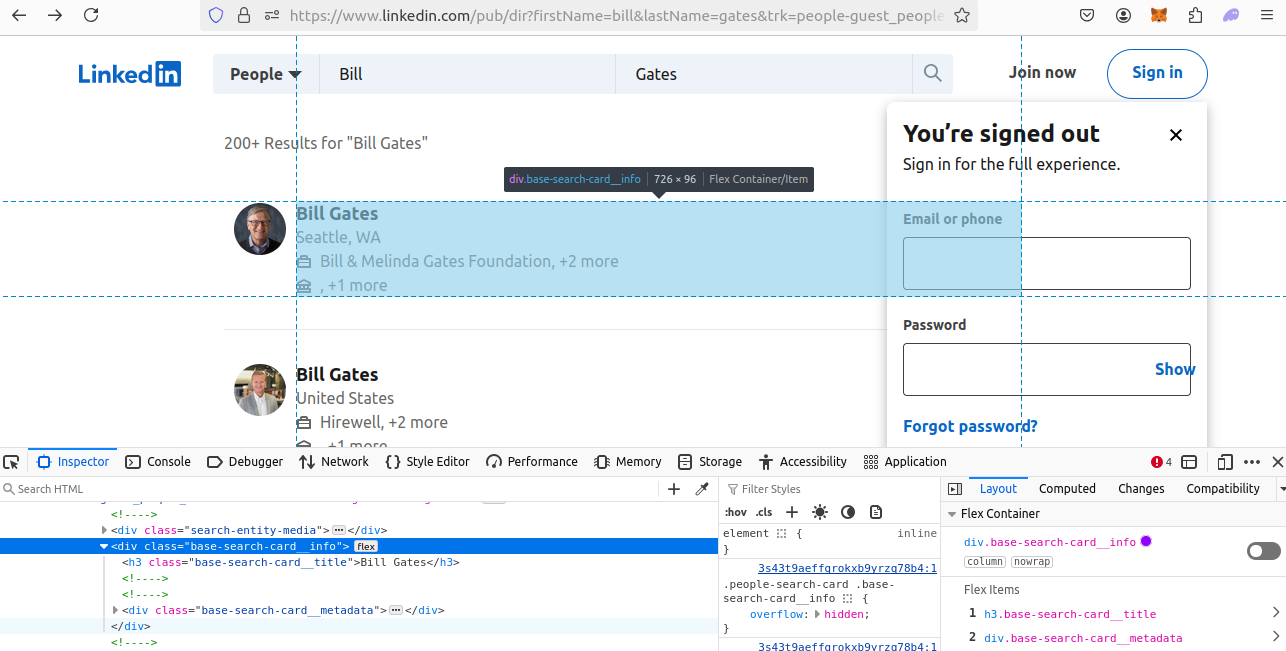 HTML Inspection LinkedIn Search Results Page
In the image below, you can see a profile page. As you can see, there is a ton of data inside the JSON blob.
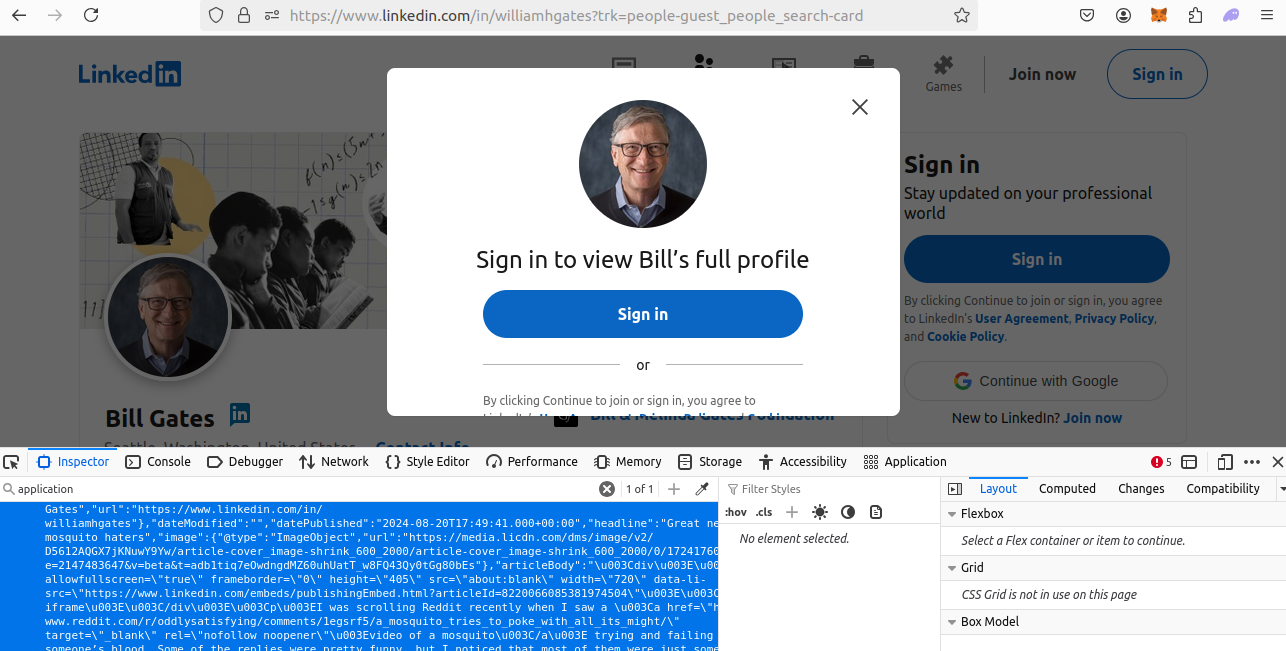 HTML Inspection LinkedIn Profile Page
Step 3: Geolocated Data
The ScrapeOps Proxy Aggregator gives us first class geolocation support. The ScrapeOps API allows us to pass a country parameter and then we get routed through the country of our choosing.
- If we want to appear in the US, we can pass
"country": "us". - If we want to appear in the UK, we can pass
"country": "uk".
You can view the full use of supported countries on this page.
ScrapeOps gives great geotargeting support at no additional charge. There are other proxy providers that charge you extra API credits to use their geotargeting.
Setting Up Our LinkedIn Profiles Scraper Project
Let's get started. We need to create a new project folder. Then we need to make sure we've got Selenium and Chromedriver installed.
You can run the following commands to get set up.
Create a New Project Folder
mkdir linkedin-profiles-scraper
cd linkedin-profiles-scraper
Create a New Virtual Environment
python -m venv venvActivate the Environment
source venv/bin/activateInstall Our Dependencies
pip install seleniumMake sure you have Chromedriver installed! Nowadays, it comes prepackaged inside of Chrome for Testing. If you don't have Chrome for Testing, you can get it here.
Build A LinkedIn Profiles Search Crawler
We know what our crawler and scraper need to do. Now, we can go about building them. This whole project starts with our crawler.
Our crawler performs a search, parses the results, and then saves the data to a CSV file. Once our crawler can do these tasks, we'll need to add concurrency and proxy support.
In the coming sections, we'll go through step by step and build all of these features into our crawler.
Step 1: Create Simple Search Data Parser
This entire project begins with a basic parsing function. We'll start our script with imports, retries and, of course, parsing logic. Everything we build afterward will be built on top of this basic design.
Take a look at our parsing function, crawl_profiles().
First, we need find all of our target div elements. Once we've found them, we can iterate through them with a for loop and extract their data.
import osimport csvimport jsonimport loggingfrom urllib.parse import urlencodefrom selenium import webdriverfrom selenium.webdriver.common.by import Byimport concurrent.futuresfrom dataclasses import dataclass, field, fields, asdict
API_KEY = ""
with open("config.json", "r") as config_file:    config = json.load(config_file)    API_KEY = config["api_key"]
options = webdriver.ChromeOptions()options.add_argument("--headless")options.add_argument("--disable-javascript")

## Logginglogging.basicConfig(level=logging.INFO)logger = logging.getLogger(__name__)


def crawl_profiles(name, location, retries=3):    first_name = name.split()[0]    last_name = name.split()[1]    url = f"https://www.linkedin.com/pub/dir?firstName={first_name}&lastName={last_name}&trk=people-guest_people-search-bar_search-submit"    tries = 0    success = False        while tries <= retries and not success:
        driver = webdriver.Chrome(options=options)
        try:            driver.get(url)                            profile_cards = driver.find_elements(By.CSS_SELECTOR, "div[class='base-search-card__info']")            for card in profile_cards:                parent = card.find_element(By.XPATH, "..")                href = parent.get_attribute("href").split("?")[0]                name = href.split("/")[-1].split("?")[0]                display_name = card.find_element(By.CSS_SELECTOR,"h3[class='base-search-card__title']").text                location = card.find_element(By.CSS_SELECTOR, "p[class='people-search-card__location']").text                companies = "n/a"                has_companies = card.find_elements(By.CSS_SELECTOR, "span[class='entity-list-meta__entities-list']")                if has_companies:                    companies = has_companies[0].text
                search_data = {                    "name": name,                    "display_name": display_name,                    "url": href,                    "location": location,                    "companies": companies                }                            print(search_data)            logger.info(f"Successfully parsed data from: {url}")            success = True                                    except Exception as e:            logger.error(f"An error occurred while processing page {url}: {e}")            logger.info(f"Retrying request for page: {url}, retries left {retries-tries}")            tries+=1                finally:            driver.quit()
    if not success:        raise Exception(f"Max Retries exceeded: {retries}")

def start_crawl(profile_list, location, retries=3):    for name in profile_list:        crawl_profiles(name, location, retries=retries)


if __name__ == "__main__":
    MAX_RETRIES = 3    MAX_THREADS = 5        LOCATION = "us"
    logger.info(f"Crawl starting...")
    ## INPUT ---> List of keywords to scrape    keyword_list = ["bill gates", "elon musk"]
    ## Job Processes    filename = "profile-crawl.csv"    start_crawl(keyword_list, LOCATION, retries=MAX_RETRIES)    logger.info(f"Crawl complete.")
driver.find_elements(By.CSS_SELECTOR, "div[class='base-search-card__info']")returns all of the profile cards we're looking for.- As we iterate through the profile cards:
card.find_element(By.XPATH, "..")finds ourparentelement.parent.get_attribute("href").split("?")[0]pulls the link to each profile.- We extract the
display_namewithcard.find_element(By.CSS_SELECTOR,"h3[class='base-search-card__title']").text. card.find_element(By.CSS_SELECTOR, "p[class='people-search-card__location']").textgives us thelocation.- We check the
spanelements to see if there are companies present and if there are companies, we extract them. If there are no companies, we assign a default value of"n/a".
Step 2: Storing the Scraped Data
After extracting our data, we need to store it. Time for a little OOP (Object Oriented Programming).
First, we'll make a dataclass called SearchData. Afterward, we'll create a DataPipeline.
We'll use SearchData to represent our result objects and we'll use the DataPipeline to pipe these objects to a CSV file.
Here is our SearchData. It's used to represent actual search results that we extract from the page.
@dataclassclass SearchData:    name: str = ""    display_name: str = ""    url: str = ""    location: str = ""    companies: str = ""
    def __post_init__(self):        self.check_string_fields()            def check_string_fields(self):        for field in fields(self):            # Check string fields            if isinstance(getattr(self, field.name), str):                # If empty set default text                if getattr(self, field.name) == "":                    setattr(self, field.name, f"No {field.name}")                    continue                # Strip any trailing spaces, etc.                value = getattr(self, field.name)                setattr(self, field.name, value.strip())
After we create our SearchData, we need to store it. We'll pass these objects into a DataPipeline. The pipeline in the snippet below takes a dataclass and saves it to a CSV file.
- If the CSV file exists, we open it in append mode.
- If it doesn't exist we write a new one.
Our DataPipeline also has some logic for filtering out duplicates using the name attribute.
class DataPipeline:        def __init__(self, csv_filename="", storage_queue_limit=50):        self.names_seen = []        self.storage_queue = []        self.storage_queue_limit = storage_queue_limit        self.csv_filename = csv_filename        self.csv_file_open = False        def save_to_csv(self):        self.csv_file_open = True        data_to_save = []        data_to_save.extend(self.storage_queue)        self.storage_queue.clear()        if not data_to_save:            return
        keys = [field.name for field in fields(data_to_save[0])]        file_exists = os.path.isfile(self.csv_filename) and os.path.getsize(self.csv_filename) > 0        with open(self.csv_filename, mode="a", newline="", encoding="utf-8") as output_file:            writer = csv.DictWriter(output_file, fieldnames=keys)
            if not file_exists:                writer.writeheader()
            for item in data_to_save:                writer.writerow(asdict(item))
        self.csv_file_open = False                        def is_duplicate(self, input_data):        if input_data.name in self.names_seen:            logger.warning(f"Duplicate item found: {input_data.name}. Item dropped.")            return True        self.names_seen.append(input_data.name)        return False                def add_data(self, scraped_data):        if self.is_duplicate(scraped_data) == False:            self.storage_queue.append(scraped_data)            if len(self.storage_queue) >= self.storage_queue_limit and self.csv_file_open == False:                self.save_to_csv()                           def close_pipeline(self):        if self.csv_file_open:            time.sleep(3)        if len(self.storage_queue) > 0:            self.save_to_csv()
After adjusting for data storage, our code now looks like this.
import osimport csvimport jsonimport loggingfrom urllib.parse import urlencodefrom selenium import webdriverfrom selenium.webdriver.common.by import Byimport concurrent.futuresfrom dataclasses import dataclass, field, fields, asdict
API_KEY = ""
with open("config.json", "r") as config_file:    config = json.load(config_file)    API_KEY = config["api_key"]
options = webdriver.ChromeOptions()options.add_argument("--headless")options.add_argument("--disable-javascript")

## Logginglogging.basicConfig(level=logging.INFO)logger = logging.getLogger(__name__)


@dataclassclass SearchData:    name: str = ""    display_name: str = ""    url: str = ""    location: str = ""    companies: str = ""
    def __post_init__(self):        self.check_string_fields()            def check_string_fields(self):        for field in fields(self):            # Check string fields            if isinstance(getattr(self, field.name), str):                # If empty set default text                if getattr(self, field.name) == "":                    setattr(self, field.name, f"No {field.name}")                    continue                # Strip any trailing spaces, etc.                value = getattr(self, field.name)                setattr(self, field.name, value.strip())

class DataPipeline:        def __init__(self, csv_filename="", storage_queue_limit=50):        self.names_seen = []        self.storage_queue = []        self.storage_queue_limit = storage_queue_limit        self.csv_filename = csv_filename        self.csv_file_open = False        def save_to_csv(self):        self.csv_file_open = True        data_to_save = []        data_to_save.extend(self.storage_queue)        self.storage_queue.clear()        if not data_to_save:            return
        keys = [field.name for field in fields(data_to_save[0])]        file_exists = os.path.isfile(self.csv_filename) and os.path.getsize(self.csv_filename) > 0        with open(self.csv_filename, mode="a", newline="", encoding="utf-8") as output_file:            writer = csv.DictWriter(output_file, fieldnames=keys)
            if not file_exists:                writer.writeheader()
            for item in data_to_save:                writer.writerow(asdict(item))
        self.csv_file_open = False                        def is_duplicate(self, input_data):        if input_data.name in self.names_seen:            logger.warning(f"Duplicate item found: {input_data.name}. Item dropped.")            return True        self.names_seen.append(input_data.name)        return False                def add_data(self, scraped_data):        if self.is_duplicate(scraped_data) == False:            self.storage_queue.append(scraped_data)            if len(self.storage_queue) >= self.storage_queue_limit and self.csv_file_open == False:                self.save_to_csv()                           def close_pipeline(self):        if self.csv_file_open:            time.sleep(3)        if len(self.storage_queue) > 0:            self.save_to_csv()


def crawl_profiles(name, location, data_pipeline=None, retries=3):    first_name = name.split()[0]    last_name = name.split()[1]    url = f"https://www.linkedin.com/pub/dir?firstName={first_name}&lastName={last_name}&trk=people-guest_people-search-bar_search-submit"    tries = 0    success = False        while tries <= retries and not success:
        driver = webdriver.Chrome(options=options)
        try:            driver.get(url)                            profile_cards = driver.find_elements(By.CSS_SELECTOR, "div[class='base-search-card__info']")            for card in profile_cards:                parent = card.find_element(By.XPATH, "..")                href = parent.get_attribute("href").split("?")[0]                name = href.split("/")[-1].split("?")[0]                display_name = card.find_element(By.CSS_SELECTOR,"h3[class='base-search-card__title']").text                location = card.find_element(By.CSS_SELECTOR, "p[class='people-search-card__location']").text                companies = "n/a"                has_companies = card.find_elements(By.CSS_SELECTOR, "span[class='entity-list-meta__entities-list']")                if has_companies:                    companies = has_companies[0].text
                search_data = SearchData(                    name=name,                    display_name=display_name,                    url=href,                    location=location,                    companies=companies                )                            data_pipeline.add_data(search_data)            logger.info(f"Successfully parsed data from: {url}")            success = True                                    except Exception as e:            logger.error(f"An error occurred while processing page {url}: {e}")            logger.info(f"Retrying request for page: {url}, retries left {retries-tries}")            tries+=1                finally:            driver.quit()
    if not success:        raise Exception(f"Max Retries exceeded: {retries}")

def start_crawl(profile_list, location, data_pipeline=None, retries=3):    for name in profile_list:        crawl_profiles(name, location, data_pipeline=data_pipeline, retries=retries)


if __name__ == "__main__":
    MAX_RETRIES = 3    MAX_THREADS = 5        LOCATION = "us"
    logger.info(f"Crawl starting...")
    ## INPUT ---> List of keywords to scrape    keyword_list = ["bill gates", "elon musk"]
## Job Processes filename = "profile-crawl.csv" crawl_pipeline = DataPipeline(csv_filename=filename) start_crawl(keyword_list, LOCATION, data_pipeline=crawl_pipeline, retries=MAX_RETRIES) crawl_pipeline.close_pipeline() logger.info(f"Crawl complete.")- When we extract search results, we convert them into
SearchData. - We pass
SearchDatainto theDataPipelineand store it to a CSV file.
Step 3: Adding Concurrency
When deploying a scraper to production, we need to make it fast and efficient. Now that we have a working scraper, we need to make it faster and more efficient.
ThreadPoolExecutor gives us the power to run a single function on multiple threads at the same time. It opens up a new thread pool with a max_threads argument. Then, it runs our function of choice on each available thread.
Take a look at the example below.
def start_crawl(profile_list, location, data_pipeline=None, max_threads=5, retries=3): with concurrent.futures.ThreadPoolExecutor(max_workers=max_threads) as executor: executor.map( crawl_profiles, profile_list, [location] * len(profile_list), [data_pipeline] * len(profile_list), [retries] * len(profile_list) )We no longer use a for loop. We create a new thread pool and call crawl_profiles on each available thread. All of our other arguments get passed in as arrays.
ThreadPoolExecutor takes these arrays and passes each element from each array into an individual instance of crawl_profiles.
import osimport csvimport jsonimport loggingfrom urllib.parse import urlencodefrom selenium import webdriverfrom selenium.webdriver.common.by import Byimport concurrent.futuresfrom dataclasses import dataclass, field, fields, asdict
API_KEY = ""
with open("config.json", "r") as config_file:    config = json.load(config_file)    API_KEY = config["api_key"]
options = webdriver.ChromeOptions()options.add_argument("--headless")options.add_argument("--disable-javascript")

## Logginglogging.basicConfig(level=logging.INFO)logger = logging.getLogger(__name__)


@dataclassclass SearchData:    name: str = ""    display_name: str = ""    url: str = ""    location: str = ""    companies: str = ""
    def __post_init__(self):        self.check_string_fields()            def check_string_fields(self):        for field in fields(self):            # Check string fields            if isinstance(getattr(self, field.name), str):                # If empty set default text                if getattr(self, field.name) == "":                    setattr(self, field.name, f"No {field.name}")                    continue                # Strip any trailing spaces, etc.                value = getattr(self, field.name)                setattr(self, field.name, value.strip())

class DataPipeline:        def __init__(self, csv_filename="", storage_queue_limit=50):        self.names_seen = []        self.storage_queue = []        self.storage_queue_limit = storage_queue_limit        self.csv_filename = csv_filename        self.csv_file_open = False        def save_to_csv(self):        self.csv_file_open = True        data_to_save = []        data_to_save.extend(self.storage_queue)        self.storage_queue.clear()        if not data_to_save:            return
        keys = [field.name for field in fields(data_to_save[0])]        file_exists = os.path.isfile(self.csv_filename) and os.path.getsize(self.csv_filename) > 0        with open(self.csv_filename, mode="a", newline="", encoding="utf-8") as output_file:            writer = csv.DictWriter(output_file, fieldnames=keys)
            if not file_exists:                writer.writeheader()
            for item in data_to_save:                writer.writerow(asdict(item))
        self.csv_file_open = False                        def is_duplicate(self, input_data):        if input_data.name in self.names_seen:            logger.warning(f"Duplicate item found: {input_data.name}. Item dropped.")            return True        self.names_seen.append(input_data.name)        return False                def add_data(self, scraped_data):        if self.is_duplicate(scraped_data) == False:            self.storage_queue.append(scraped_data)            if len(self.storage_queue) >= self.storage_queue_limit and self.csv_file_open == False:                self.save_to_csv()                           def close_pipeline(self):        if self.csv_file_open:            time.sleep(3)        if len(self.storage_queue) > 0:            self.save_to_csv()


def crawl_profiles(name, location, data_pipeline=None, retries=3):    first_name = name.split()[0]    last_name = name.split()[1]    url = f"https://www.linkedin.com/pub/dir?firstName={first_name}&lastName={last_name}&trk=people-guest_people-search-bar_search-submit"    tries = 0    success = False        while tries <= retries and not success:
        driver = webdriver.Chrome(options=options)
        try:            driver.get(url)                            profile_cards = driver.find_elements(By.CSS_SELECTOR, "div[class='base-search-card__info']")            for card in profile_cards:                parent = card.find_element(By.XPATH, "..")                href = parent.get_attribute("href").split("?")[0]                name = href.split("/")[-1].split("?")[0]                display_name = card.find_element(By.CSS_SELECTOR,"h3[class='base-search-card__title']").text                location = card.find_element(By.CSS_SELECTOR, "p[class='people-search-card__location']").text                companies = "n/a"                has_companies = card.find_elements(By.CSS_SELECTOR, "span[class='entity-list-meta__entities-list']")                if has_companies:                    companies = has_companies[0].text
                search_data = SearchData(                    name=name,                    display_name=display_name,                    url=href,                    location=location,                    companies=companies                )                            data_pipeline.add_data(search_data)            logger.info(f"Successfully parsed data from: {url}")            success = True                                    except Exception as e:            logger.error(f"An error occurred while processing page {url}: {e}")            logger.info(f"Retrying request for page: {url}, retries left {retries-tries}")            tries+=1                finally:            driver.quit()
    if not success:        raise Exception(f"Max Retries exceeded: {retries}")

def start_crawl(profile_list, location, data_pipeline=None, max_threads=5, retries=3):    with concurrent.futures.ThreadPoolExecutor(max_workers=max_threads) as executor:        executor.map(            crawl_profiles,            profile_list,            [location] * len(profile_list),            [data_pipeline] * len(profile_list),            [retries] * len(profile_list)        )


if __name__ == "__main__":
    MAX_RETRIES = 3    MAX_THREADS = 5        LOCATION = "us"
    logger.info(f"Crawl starting...")
    ## INPUT ---> List of keywords to scrape    keyword_list = ["bill gates", "elon musk"]
    ## Job Processes    filename = "profile-crawl.csv"    crawl_pipeline = DataPipeline(csv_filename=filename)    start_crawl(keyword_list, LOCATION, data_pipeline=crawl_pipeline, max_threads=MAX_THREADS, retries=MAX_RETRIES)    crawl_pipeline.close_pipeline()    logger.info(f"Crawl complete.")
Step 5: Bypassing Anti-Bots
As we mentioned earlier, we'll use the ScrapeOps Proxy Aggregator to bypass anti-bots. This one function will unlock the power of the ScrapeOps Proxy.
We take in a URL, and then wrap it up with our api_key, and location using some URL encoding. This returns a new URL using the full power of the ScrapeOps Proxy.
When we talk to the ScrapeOps API, the country param tells ScrapeOps our location of choice. ScrapeOps then routes us through a server based in that location.
There are many other options we can use such as residential and mobile but typically, our country parameter is enough.
def get_scrapeops_url(url, location="us"): payload = { "api_key": API_KEY, "url": url, "country": location, } proxy_url = "https://proxy.scrapeops.io/v1/?" + urlencode(payload) return proxy_urlHere is our finished crawler.
import osimport csvimport jsonimport loggingfrom urllib.parse import urlencodefrom selenium import webdriverfrom selenium.webdriver.common.by import Byimport concurrent.futuresfrom dataclasses import dataclass, field, fields, asdict
API_KEY = ""
with open("config.json", "r") as config_file:    config = json.load(config_file)    API_KEY = config["api_key"]
options = webdriver.ChromeOptions()options.add_argument("--headless")options.add_argument("--disable-javascript")
def get_scrapeops_url(url, location="us"):    payload = {        "api_key": API_KEY,        "url": url,        "country": location,        }    proxy_url = "https://proxy.scrapeops.io/v1/?" + urlencode(payload)    return proxy_url

## Logginglogging.basicConfig(level=logging.INFO)logger = logging.getLogger(__name__)


@dataclassclass SearchData:    name: str = ""    display_name: str = ""    url: str = ""    location: str = ""    companies: str = ""
    def __post_init__(self):        self.check_string_fields()            def check_string_fields(self):        for field in fields(self):            # Check string fields            if isinstance(getattr(self, field.name), str):                # If empty set default text                if getattr(self, field.name) == "":                    setattr(self, field.name, f"No {field.name}")                    continue                # Strip any trailing spaces, etc.                value = getattr(self, field.name)                setattr(self, field.name, value.strip())

class DataPipeline:        def __init__(self, csv_filename="", storage_queue_limit=50):        self.names_seen = []        self.storage_queue = []        self.storage_queue_limit = storage_queue_limit        self.csv_filename = csv_filename        self.csv_file_open = False        def save_to_csv(self):        self.csv_file_open = True        data_to_save = []        data_to_save.extend(self.storage_queue)        self.storage_queue.clear()        if not data_to_save:            return
        keys = [field.name for field in fields(data_to_save[0])]        file_exists = os.path.isfile(self.csv_filename) and os.path.getsize(self.csv_filename) > 0        with open(self.csv_filename, mode="a", newline="", encoding="utf-8") as output_file:            writer = csv.DictWriter(output_file, fieldnames=keys)
            if not file_exists:                writer.writeheader()
            for item in data_to_save:                writer.writerow(asdict(item))
        self.csv_file_open = False                        def is_duplicate(self, input_data):        if input_data.name in self.names_seen:            logger.warning(f"Duplicate item found: {input_data.name}. Item dropped.")            return True        self.names_seen.append(input_data.name)        return False                def add_data(self, scraped_data):        if self.is_duplicate(scraped_data) == False:            self.storage_queue.append(scraped_data)            if len(self.storage_queue) >= self.storage_queue_limit and self.csv_file_open == False:                self.save_to_csv()                           def close_pipeline(self):        if self.csv_file_open:            time.sleep(3)        if len(self.storage_queue) > 0:            self.save_to_csv()


def crawl_profiles(name, location, data_pipeline=None, retries=3):    first_name = name.split()[0]    last_name = name.split()[1]    url = f"https://www.linkedin.com/pub/dir?firstName={first_name}&lastName={last_name}&trk=people-guest_people-search-bar_search-submit"    tries = 0    success = False        while tries <= retries and not success:
        driver = webdriver.Chrome(options=options)
        try:            scrapeops_proxy_url = get_scrapeops_url(url, location=location)            driver.get(scrapeops_proxy_url)                            profile_cards = driver.find_elements(By.CSS_SELECTOR, "div[class='base-search-card__info']")            for card in profile_cards:                parent = card.find_element(By.XPATH, "..")                href = parent.get_attribute("href").split("?")[0]                name = href.split("/")[-1].split("?")[0]                display_name = card.find_element(By.CSS_SELECTOR,"h3[class='base-search-card__title']").text                location = card.find_element(By.CSS_SELECTOR, "p[class='people-search-card__location']").text                companies = "n/a"                has_companies = card.find_elements(By.CSS_SELECTOR, "span[class='entity-list-meta__entities-list']")                if has_companies:                    companies = has_companies[0].text
                search_data = SearchData(                    name=name,                    display_name=display_name,                    url=href,                    location=location,                    companies=companies                )                            data_pipeline.add_data(search_data)            logger.info(f"Successfully parsed data from: {url}")            success = True                                    except Exception as e:            logger.error(f"An error occurred while processing page {url}: {e}")            logger.info(f"Retrying request for page: {url}, retries left {retries-tries}")            tries+=1                finally:            driver.quit()
    if not success:        raise Exception(f"Max Retries exceeded: {retries}")

def start_crawl(profile_list, location, data_pipeline=None, max_threads=5, retries=3):    with concurrent.futures.ThreadPoolExecutor(max_workers=max_threads) as executor:        executor.map(            crawl_profiles,            profile_list,            [location] * len(profile_list),            [data_pipeline] * len(profile_list),            [retries] * len(profile_list)        )


if __name__ == "__main__":
    MAX_RETRIES = 3    MAX_THREADS = 5        LOCATION = "us"
    logger.info(f"Crawl starting...")
    ## INPUT ---> List of keywords to scrape    keyword_list = ["bill gates", "elon musk"]
    ## Job Processes    filename = "profile-crawl.csv"    crawl_pipeline = DataPipeline(csv_filename=filename)    start_crawl(keyword_list, LOCATION, data_pipeline=crawl_pipeline, max_threads=MAX_THREADS, retries=MAX_RETRIES)    crawl_pipeline.close_pipeline()    logger.info(f"Crawl complete.")
Step 6: Production Run
Let's get a feel for how our crawler performs. If you want different results, feel free to change any of the following from our main. You can run this script with the following command: python name_of_your_script.py.
MAX_RETRIESMAX_THREADSLOCATIONkeyword_list
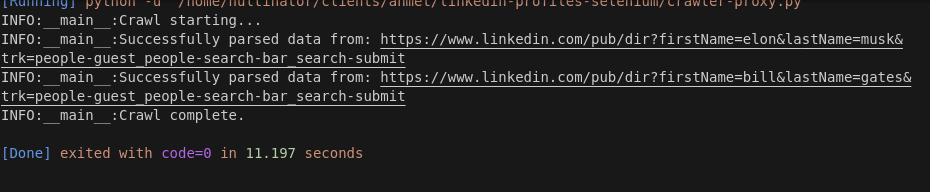 Crawler Performance
As you can see in the screenshot above, we crawled two names in 11.197 seconds. 11.197 / 2 = 5.599 seconds per search. Especially for Selenium, this is pretty good.
Build A LinkedIn Profile Scraper
We now have a fully functional crawler. Our next step is to build a scraper. Our scraper will read our crawler report and scrape each indiviudal profile that we discovered during the crawl. We'll add each feature with iterative building, just like we did with the crawler.
Step 1: Create Simple Profile Data Parser
As usual, we need a parsing function. We'll add retry logic, error handling and follow the basic structure we've used from the very beginning.
scrape_profile() fetches a profile. We find the head of the page. From inside the head, we find the JSON blob that contains all of our profile_data.
def scrape_profile(row, location, retries=3):    url = row["url"]    tries = 0    success = False
    while tries <= retries and not success:
        driver = webdriver.Chrome(options=options)
        try:            driver.get(url)            head = driver.find_element(By.CSS_SELECTOR, "head")            script = head.find_element(By.CSS_SELECTOR, "script[type='application/ld+json']")            json_data_graph = json.loads(script.get_attribute("innerHTML"))["@graph"]            json_data = {}            for element in json_data_graph:                if element["@type"] == "Person":                    json_data = element                    break
            company = "n/a"            company_profile = "n/a"            job_title = "n/a"                        if "jobTitle" in json_data.keys() and type(json_data["jobTitle"] == list) and len(json_data["jobTitle"]) > 0:                job_title = json_data["jobTitle"][0]                        has_company = "worksFor" in json_data.keys() and len(json_data["worksFor"]) > 0            if has_company:                company = json_data["worksFor"][0]["name"]                has_company_url = "url" in json_data["worksFor"][0].keys()                if has_company_url:                    company_profile = json_data["worksFor"][0]["url"]                        has_interactions = "interactionStatistic" in json_data.keys()            followers = 0            if has_interactions:                stats = json_data["interactionStatistic"]                if stats["name"] == "Follows" and stats["@type"] == "InteractionCounter":                    followers = stats["userInteractionCount"]                        profile_data = {                "name": row["name"],                "company": company,                "company_profile": company_profile,                "job_title": job_title,                "followers": followers            }            print(profile_data)                   success = True                        except Exception as e:            logger.error(f"Exception thrown: {e}")            logger.warning(f"Failed to process page: {row['url']}, retries left: {retries-tries}")            tries += 1
        finally:            driver.quit()
    if not success:        raise Exception(f"Max Retries exceeded: {retries}")
else: logger.info(f"Successfully parsed: {row['url']}")- First, we find the
headof the page:driver.find_element(By.CSS_SELECTOR, "head"). head.find_element(By.CSS_SELECTOR, "script[type='application/ld+json']")finds the JSON blob inside thehead.- We load the JSON and iterate through the
"@graph"element until we find a field called"Person". We use this"Person"field to extract our data. - We attempt to extract the following and set defaults just in case something is not found:
company: the company that a person works for.company_profile: the company's LinkedIn profile.job_title: the person's official job title.followers: the amount of other people following this person.
Step 2: Loading URLs To Scrape
Our parsing function takes a row as an argument. We need to write another function called process_results().
The goal here is simple: read our CSV file into an array of dict objects. Then, run scrape_profile() on each profile from the array.
def process_results(csv_file, location, retries=3):    logger.info(f"processing {csv_file}")    with open(csv_file, newline="") as file:        reader = list(csv.DictReader(file))
        for row in reader:            scrape_profile(row, location, retries=retries)
You can see how everything fits together in our code below.
import osimport csvimport jsonimport loggingfrom urllib.parse import urlencodefrom selenium import webdriverfrom selenium.webdriver.common.by import Byimport concurrent.futuresfrom dataclasses import dataclass, field, fields, asdict
API_KEY = ""
with open("config.json", "r") as config_file:    config = json.load(config_file)    API_KEY = config["api_key"]
options = webdriver.ChromeOptions()options.add_argument("--headless")options.add_argument("--disable-javascript")
def get_scrapeops_url(url, location="us"):    payload = {        "api_key": API_KEY,        "url": url,        "country": location,        }    proxy_url = "https://proxy.scrapeops.io/v1/?" + urlencode(payload)    return proxy_url

## Logginglogging.basicConfig(level=logging.INFO)logger = logging.getLogger(__name__)


@dataclassclass SearchData:    name: str = ""    display_name: str = ""    url: str = ""    location: str = ""    companies: str = ""
    def __post_init__(self):        self.check_string_fields()            def check_string_fields(self):        for field in fields(self):            # Check string fields            if isinstance(getattr(self, field.name), str):                # If empty set default text                if getattr(self, field.name) == "":                    setattr(self, field.name, f"No {field.name}")                    continue                # Strip any trailing spaces, etc.                value = getattr(self, field.name)                setattr(self, field.name, value.strip())

class DataPipeline:        def __init__(self, csv_filename="", storage_queue_limit=50):        self.names_seen = []        self.storage_queue = []        self.storage_queue_limit = storage_queue_limit        self.csv_filename = csv_filename        self.csv_file_open = False        def save_to_csv(self):        self.csv_file_open = True        data_to_save = []        data_to_save.extend(self.storage_queue)        self.storage_queue.clear()        if not data_to_save:            return
        keys = [field.name for field in fields(data_to_save[0])]        file_exists = os.path.isfile(self.csv_filename) and os.path.getsize(self.csv_filename) > 0        with open(self.csv_filename, mode="a", newline="", encoding="utf-8") as output_file:            writer = csv.DictWriter(output_file, fieldnames=keys)
            if not file_exists:                writer.writeheader()
            for item in data_to_save:                writer.writerow(asdict(item))
        self.csv_file_open = False                        def is_duplicate(self, input_data):        if input_data.name in self.names_seen:            logger.warning(f"Duplicate item found: {input_data.name}. Item dropped.")            return True        self.names_seen.append(input_data.name)        return False                def add_data(self, scraped_data):        if self.is_duplicate(scraped_data) == False:            self.storage_queue.append(scraped_data)            if len(self.storage_queue) >= self.storage_queue_limit and self.csv_file_open == False:                self.save_to_csv()                           def close_pipeline(self):        if self.csv_file_open:            time.sleep(3)        if len(self.storage_queue) > 0:            self.save_to_csv()


def crawl_profiles(name, location, data_pipeline=None, retries=3):    first_name = name.split()[0]    last_name = name.split()[1]    url = f"https://www.linkedin.com/pub/dir?firstName={first_name}&lastName={last_name}&trk=people-guest_people-search-bar_search-submit"    tries = 0    success = False        while tries <= retries and not success:
        driver = webdriver.Chrome(options=options)
        try:            scrapeops_proxy_url = get_scrapeops_url(url, location=location)            driver.get(scrapeops_proxy_url)                            profile_cards = driver.find_elements(By.CSS_SELECTOR, "div[class='base-search-card__info']")            for card in profile_cards:                parent = card.find_element(By.XPATH, "..")                href = parent.get_attribute("href").split("?")[0]                name = href.split("/")[-1].split("?")[0]                display_name = card.find_element(By.CSS_SELECTOR,"h3[class='base-search-card__title']").text                location = card.find_element(By.CSS_SELECTOR, "p[class='people-search-card__location']").text                companies = "n/a"                has_companies = card.find_elements(By.CSS_SELECTOR, "span[class='entity-list-meta__entities-list']")                if has_companies:                    companies = has_companies[0].text
                search_data = SearchData(                    name=name,                    display_name=display_name,                    url=href,                    location=location,                    companies=companies                )                            data_pipeline.add_data(search_data)            logger.info(f"Successfully parsed data from: {url}")            success = True                                    except Exception as e:            logger.error(f"An error occurred while processing page {url}: {e}")            logger.info(f"Retrying request for page: {url}, retries left {retries-tries}")            tries+=1                finally:            driver.quit()
    if not success:        raise Exception(f"Max Retries exceeded: {retries}")

def start_crawl(profile_list, location, data_pipeline=None, max_threads=5, retries=3):    with concurrent.futures.ThreadPoolExecutor(max_workers=max_threads) as executor:        executor.map(            crawl_profiles,            profile_list,            [location] * len(profile_list),            [data_pipeline] * len(profile_list),            [retries] * len(profile_list)        )

def scrape_profile(row, location, retries=3):    url = row["url"]    tries = 0    success = False
    while tries <= retries and not success:
        driver = webdriver.Chrome(options=options)
        try:            driver.get(url)            head = driver.find_element(By.CSS_SELECTOR, "head")            script = head.find_element(By.CSS_SELECTOR, "script[type='application/ld+json']")            json_data_graph = json.loads(script.get_attribute("innerHTML"))["@graph"]            json_data = {}            for element in json_data_graph:                if element["@type"] == "Person":                    json_data = element                    break
            company = "n/a"            company_profile = "n/a"            job_title = "n/a"                        if "jobTitle" in json_data.keys() and type(json_data["jobTitle"] == list) and len(json_data["jobTitle"]) > 0:                job_title = json_data["jobTitle"][0]                        has_company = "worksFor" in json_data.keys() and len(json_data["worksFor"]) > 0            if has_company:                company = json_data["worksFor"][0]["name"]                has_company_url = "url" in json_data["worksFor"][0].keys()                if has_company_url:                    company_profile = json_data["worksFor"][0]["url"]                        has_interactions = "interactionStatistic" in json_data.keys()            followers = 0            if has_interactions:                stats = json_data["interactionStatistic"]                if stats["name"] == "Follows" and stats["@type"] == "InteractionCounter":                    followers = stats["userInteractionCount"]                        profile_data = {                "name": row["name"],                "company": company,                "company_profile": company_profile,                "job_title": job_title,                "followers": followers            }            print(profile_data)                   success = True                        except Exception as e:            logger.error(f"Exception thrown: {e}")            logger.warning(f"Failed to process page: {row['url']}, retries left: {retries-tries}")            tries += 1
        finally:            driver.quit()
    if not success:        raise Exception(f"Max Retries exceeded: {retries}")
    else:        logger.info(f"Successfully parsed: {row['url']}")

def process_results(csv_file, location, max_threads=5, retries=3):    logger.info(f"processing {csv_file}")    with open(csv_file, newline="") as file:        reader = list(csv.DictReader(file))
        for row in reader:            scrape_profile(row, location, retries=retries)
if __name__ == "__main__":
    MAX_RETRIES = 3    MAX_THREADS = 5        LOCATION = "us"
    logger.info(f"Crawl starting...")
    ## INPUT ---> List of keywords to scrape    keyword_list = ["bill gates", "elon musk"]
    ## Job Processes    filename = "profile-crawl.csv"    crawl_pipeline = DataPipeline(csv_filename=filename)    start_crawl(keyword_list, LOCATION, data_pipeline=crawl_pipeline, max_threads=MAX_THREADS, retries=MAX_RETRIES)    crawl_pipeline.close_pipeline()    logger.info(f"Crawl complete.")
process_results(filename, LOCATION, retries=MAX_RETRIES)scrape_profile()extracts data from individual profiles.process_results()reads our CSV file and runsscrape_profile()on all of the profiles from our CSV.
Step 3: Storing the Scraped Data
Our DataPipeline already stores data. For our crawler, we wrote a SearchData class to pass into this DataPipeline. Both of these classes are technically reusable but SearchData won't work for this case. We need another dataclass with some different fields.
Take a look at our new dataclass. This one is called ProfileData.
@dataclassclass ProfileData:    name: str = ""    company: str = ""    company_profile: str = ""    job_title: str = ""    followers: int = 0
    def __post_init__(self):        self.check_string_fields()            def check_string_fields(self):        for field in fields(self):            # Check string fields            if isinstance(getattr(self, field.name), str):                # If empty set default text                if getattr(self, field.name) == "":                    setattr(self, field.name, f"No {field.name}")                    continue                # Strip any trailing spaces, etc.                value = getattr(self, field.name)                setattr(self, field.name, value.strip())
In our updated code, we create a new DataPipeline from within our parsing function and pass ProfileData objects into it.
import osimport csvimport jsonimport loggingfrom urllib.parse import urlencodefrom selenium import webdriverfrom selenium.webdriver.common.by import Byimport concurrent.futuresfrom dataclasses import dataclass, field, fields, asdict
API_KEY = ""
with open("config.json", "r") as config_file:    config = json.load(config_file)    API_KEY = config["api_key"]
options = webdriver.ChromeOptions()options.add_argument("--headless")options.add_argument("--disable-javascript")
def get_scrapeops_url(url, location="us"):    payload = {        "api_key": API_KEY,        "url": url,        "country": location,        }    proxy_url = "https://proxy.scrapeops.io/v1/?" + urlencode(payload)    return proxy_url

## Logginglogging.basicConfig(level=logging.INFO)logger = logging.getLogger(__name__)


@dataclassclass SearchData:    name: str = ""    display_name: str = ""    url: str = ""    location: str = ""    companies: str = ""
    def __post_init__(self):        self.check_string_fields()            def check_string_fields(self):        for field in fields(self):            # Check string fields            if isinstance(getattr(self, field.name), str):                # If empty set default text                if getattr(self, field.name) == "":                    setattr(self, field.name, f"No {field.name}")                    continue                # Strip any trailing spaces, etc.                value = getattr(self, field.name)                setattr(self, field.name, value.strip())
@dataclassclass ProfileData:    name: str = ""    company: str = ""    company_profile: str = ""    job_title: str = ""    followers: int = 0


    def __post_init__(self):        self.check_string_fields()            def check_string_fields(self):        for field in fields(self):            # Check string fields            if isinstance(getattr(self, field.name), str):                # If empty set default text                if getattr(self, field.name) == "":                    setattr(self, field.name, f"No {field.name}")                    continue                # Strip any trailing spaces, etc.                value = getattr(self, field.name)                setattr(self, field.name, value.strip())

class DataPipeline:        def __init__(self, csv_filename="", storage_queue_limit=50):        self.names_seen = []        self.storage_queue = []        self.storage_queue_limit = storage_queue_limit        self.csv_filename = csv_filename        self.csv_file_open = False        def save_to_csv(self):        self.csv_file_open = True        data_to_save = []        data_to_save.extend(self.storage_queue)        self.storage_queue.clear()        if not data_to_save:            return
        keys = [field.name for field in fields(data_to_save[0])]        file_exists = os.path.isfile(self.csv_filename) and os.path.getsize(self.csv_filename) > 0        with open(self.csv_filename, mode="a", newline="", encoding="utf-8") as output_file:            writer = csv.DictWriter(output_file, fieldnames=keys)
            if not file_exists:                writer.writeheader()
            for item in data_to_save:                writer.writerow(asdict(item))
        self.csv_file_open = False                        def is_duplicate(self, input_data):        if input_data.name in self.names_seen:            logger.warning(f"Duplicate item found: {input_data.name}. Item dropped.")            return True        self.names_seen.append(input_data.name)        return False                def add_data(self, scraped_data):        if self.is_duplicate(scraped_data) == False:            self.storage_queue.append(scraped_data)            if len(self.storage_queue) >= self.storage_queue_limit and self.csv_file_open == False:                self.save_to_csv()                           def close_pipeline(self):        if self.csv_file_open:            time.sleep(3)        if len(self.storage_queue) > 0:            self.save_to_csv()


def crawl_profiles(name, location, data_pipeline=None, retries=3):    first_name = name.split()[0]    last_name = name.split()[1]    url = f"https://www.linkedin.com/pub/dir?firstName={first_name}&lastName={last_name}&trk=people-guest_people-search-bar_search-submit"    tries = 0    success = False        while tries <= retries and not success:
        driver = webdriver.Chrome(options=options)
        try:            scrapeops_proxy_url = get_scrapeops_url(url, location=location)            driver.get(scrapeops_proxy_url)                            profile_cards = driver.find_elements(By.CSS_SELECTOR, "div[class='base-search-card__info']")            for card in profile_cards:                parent = card.find_element(By.XPATH, "..")                href = parent.get_attribute("href").split("?")[0]                name = href.split("/")[-1].split("?")[0]                display_name = card.find_element(By.CSS_SELECTOR,"h3[class='base-search-card__title']").text                location = card.find_element(By.CSS_SELECTOR, "p[class='people-search-card__location']").text                companies = "n/a"                has_companies = card.find_elements(By.CSS_SELECTOR, "span[class='entity-list-meta__entities-list']")                if has_companies:                    companies = has_companies[0].text
                search_data = SearchData(                    name=name,                    display_name=display_name,                    url=href,                    location=location,                    companies=companies                )                            data_pipeline.add_data(search_data)            logger.info(f"Successfully parsed data from: {url}")            success = True                                    except Exception as e:            logger.error(f"An error occurred while processing page {url}: {e}")            logger.info(f"Retrying request for page: {url}, retries left {retries-tries}")            tries+=1                finally:            driver.quit()
    if not success:        raise Exception(f"Max Retries exceeded: {retries}")

def start_crawl(profile_list, location, data_pipeline=None, max_threads=5, retries=3):    with concurrent.futures.ThreadPoolExecutor(max_workers=max_threads) as executor:        executor.map(            crawl_profiles,            profile_list,            [location] * len(profile_list),            [data_pipeline] * len(profile_list),            [retries] * len(profile_list)        )

def scrape_profile(row, location, retries=3):    url = row["url"]    tries = 0    success = False
    while tries <= retries and not success:
        driver = webdriver.Chrome(options=options)
        try:            driver.get(url)            head = driver.find_element(By.CSS_SELECTOR, "head")            script = head.find_element(By.CSS_SELECTOR, "script[type='application/ld+json']")            json_data_graph = json.loads(script.get_attribute("innerHTML"))["@graph"]            json_data = {}            person_pipeline = DataPipeline(f"{row['name']}.csv")            for element in json_data_graph:                if element["@type"] == "Person":                    json_data = element                    break
            company = "n/a"            company_profile = "n/a"            job_title = "n/a"                        if "jobTitle" in json_data.keys() and type(json_data["jobTitle"] == list) and len(json_data["jobTitle"]) > 0:                job_title = json_data["jobTitle"][0]                        has_company = "worksFor" in json_data.keys() and len(json_data["worksFor"]) > 0            if has_company:                company = json_data["worksFor"][0]["name"]                has_company_url = "url" in json_data["worksFor"][0].keys()                if has_company_url:                    company_profile = json_data["worksFor"][0]["url"]                        has_interactions = "interactionStatistic" in json_data.keys()            followers = 0            if has_interactions:                stats = json_data["interactionStatistic"]                if stats["name"] == "Follows" and stats["@type"] == "InteractionCounter":                    followers = stats["userInteractionCount"]                        profile_data = ProfileData (                name=row["name"],                company=company,                company_profile=company_profile,                job_title=job_title,                followers=followers            )            person_pipeline.add_data(profile_data)                   person_pipeline.close_pipeline()            success = True                        except Exception as e:            logger.error(f"Exception thrown: {e}")            logger.warning(f"Failed to process page: {row['url']}, retries left: {retries-tries}")            tries += 1
        finally:            driver.quit()
    if not success:        raise Exception(f"Max Retries exceeded: {retries}")
    else:        logger.info(f"Successfully parsed: {row['url']}")

def process_results(csv_file, location, max_threads=5, retries=3):    logger.info(f"processing {csv_file}")    with open(csv_file, newline="") as file:        reader = list(csv.DictReader(file))
        for row in reader:            scrape_profile(row, location, retries=retries)
if __name__ == "__main__":
    MAX_RETRIES = 3    MAX_THREADS = 5        LOCATION = "us"
    logger.info(f"Crawl starting...")
    ## INPUT ---> List of keywords to scrape    keyword_list = ["bill gates", "elon musk"]
    ## Job Processes    filename = "profile-crawl.csv"    crawl_pipeline = DataPipeline(csv_filename=filename)    start_crawl(keyword_list, LOCATION, data_pipeline=crawl_pipeline, max_threads=MAX_THREADS, retries=MAX_RETRIES)    crawl_pipeline.close_pipeline()    logger.info(f"Crawl complete.")
process_results(filename, LOCATION, retries=MAX_RETRIES)- We use
ProfileDatato represent data scraped from individual profiles. - We pass our
ProfileDataobjects directly into aDataPipelinejust like we did withSearchDataearlier in this project.
Step 4: Adding Concurrency
We're now parsing and storing. Next, we need to add concurrency. Once again use ThreadPoolExecutor to run our parsing function. Our first argument is scrape_profile (the function we wish to call).
All other arguments to scrape_profile get passed in as arrays, just like before when we added multithreading.
def process_results(csv_file, location, max_threads=5, retries=3):    logger.info(f"processing {csv_file}")    with open(csv_file, newline="") as file:        reader = list(csv.DictReader(file))
        with concurrent.futures.ThreadPoolExecutor(max_workers=max_threads) as executor:            executor.map(                scrape_profile,                reader,                [location] * len(reader),                [retries] * len(reader)            )
Step 5: Bypassing Anti-Bots
We already have our proxy function, get_scrapeops_url(). To get past anti-bots on the profile page, we just need to use our proxy function in the right spot.
We'll going to change one line from our parsing function, driver.get().
driver.get(get_scrapeops_url(url))We have unlocked the power of proxy.
Our full code is available below.
import osimport csvimport jsonimport loggingfrom urllib.parse import urlencodefrom selenium import webdriverfrom selenium.webdriver.common.by import Byimport concurrent.futuresfrom dataclasses import dataclass, field, fields, asdict
API_KEY = ""
with open("config.json", "r") as config_file:    config = json.load(config_file)    API_KEY = config["api_key"]
options = webdriver.ChromeOptions()options.add_argument("--headless")options.add_argument("--disable-javascript")
def get_scrapeops_url(url, location="us"):    payload = {        "api_key": API_KEY,        "url": url,        "country": location,        }    proxy_url = "https://proxy.scrapeops.io/v1/?" + urlencode(payload)    return proxy_url

## Logginglogging.basicConfig(level=logging.INFO)logger = logging.getLogger(__name__)


@dataclassclass SearchData:    name: str = ""    display_name: str = ""    url: str = ""    location: str = ""    companies: str = ""
    def __post_init__(self):        self.check_string_fields()            def check_string_fields(self):        for field in fields(self):            # Check string fields            if isinstance(getattr(self, field.name), str):                # If empty set default text                if getattr(self, field.name) == "":                    setattr(self, field.name, f"No {field.name}")                    continue                # Strip any trailing spaces, etc.                value = getattr(self, field.name)                setattr(self, field.name, value.strip())
@dataclassclass ProfileData:    name: str = ""    company: str = ""    company_profile: str = ""    job_title: str = ""    followers: int = 0


    def __post_init__(self):        self.check_string_fields()            def check_string_fields(self):        for field in fields(self):            # Check string fields            if isinstance(getattr(self, field.name), str):                # If empty set default text                if getattr(self, field.name) == "":                    setattr(self, field.name, f"No {field.name}")                    continue                # Strip any trailing spaces, etc.                value = getattr(self, field.name)                setattr(self, field.name, value.strip())

class DataPipeline:        def __init__(self, csv_filename="", storage_queue_limit=50):        self.names_seen = []        self.storage_queue = []        self.storage_queue_limit = storage_queue_limit        self.csv_filename = csv_filename        self.csv_file_open = False        def save_to_csv(self):        self.csv_file_open = True        data_to_save = []        data_to_save.extend(self.storage_queue)        self.storage_queue.clear()        if not data_to_save:            return
        keys = [field.name for field in fields(data_to_save[0])]        file_exists = os.path.isfile(self.csv_filename) and os.path.getsize(self.csv_filename) > 0        with open(self.csv_filename, mode="a", newline="", encoding="utf-8") as output_file:            writer = csv.DictWriter(output_file, fieldnames=keys)
            if not file_exists:                writer.writeheader()
            for item in data_to_save:                writer.writerow(asdict(item))
        self.csv_file_open = False                        def is_duplicate(self, input_data):        if input_data.name in self.names_seen:            logger.warning(f"Duplicate item found: {input_data.name}. Item dropped.")            return True        self.names_seen.append(input_data.name)        return False                def add_data(self, scraped_data):        if self.is_duplicate(scraped_data) == False:            self.storage_queue.append(scraped_data)            if len(self.storage_queue) >= self.storage_queue_limit and self.csv_file_open == False:                self.save_to_csv()                           def close_pipeline(self):        if self.csv_file_open:            time.sleep(3)        if len(self.storage_queue) > 0:            self.save_to_csv()


def crawl_profiles(name, location, data_pipeline=None, retries=3):    first_name = name.split()[0]    last_name = name.split()[1]    url = f"https://www.linkedin.com/pub/dir?firstName={first_name}&lastName={last_name}&trk=people-guest_people-search-bar_search-submit"    tries = 0    success = False        while tries <= retries and not success:
        driver = webdriver.Chrome(options=options)
        try:            scrapeops_proxy_url = get_scrapeops_url(url, location=location)            driver.get(scrapeops_proxy_url)                            profile_cards = driver.find_elements(By.CSS_SELECTOR, "div[class='base-search-card__info']")            for card in profile_cards:                parent = card.find_element(By.XPATH, "..")                href = parent.get_attribute("href").split("?")[0]                name = href.split("/")[-1].split("?")[0]                display_name = card.find_element(By.CSS_SELECTOR,"h3[class='base-search-card__title']").text                location = card.find_element(By.CSS_SELECTOR, "p[class='people-search-card__location']").text                companies = "n/a"                has_companies = card.find_elements(By.CSS_SELECTOR, "span[class='entity-list-meta__entities-list']")                if has_companies:                    companies = has_companies[0].text
                search_data = SearchData(                    name=name,                    display_name=display_name,                    url=href,                    location=location,                    companies=companies                )                            data_pipeline.add_data(search_data)            logger.info(f"Successfully parsed data from: {url}")            success = True                                    except Exception as e:            logger.error(f"An error occurred while processing page {url}: {e}")            logger.info(f"Retrying request for page: {url}, retries left {retries-tries}")            tries+=1                finally:            driver.quit()
    if not success:        raise Exception(f"Max Retries exceeded: {retries}")

def start_crawl(profile_list, location, data_pipeline=None, max_threads=5, retries=3):    with concurrent.futures.ThreadPoolExecutor(max_workers=max_threads) as executor:        executor.map(            crawl_profiles,            profile_list,            [location] * len(profile_list),            [data_pipeline] * len(profile_list),            [retries] * len(profile_list)        )

def scrape_profile(row, location, retries=3):    url = row["url"]    tries = 0    success = False
    while tries <= retries and not success:
        driver = webdriver.Chrome(options=options)
        try:            driver.get(get_scrapeops_url(url))            head = driver.find_element(By.CSS_SELECTOR, "head")            script = head.find_element(By.CSS_SELECTOR, "script[type='application/ld+json']")            json_data_graph = json.loads(script.get_attribute("innerHTML"))["@graph"]            json_data = {}            person_pipeline = DataPipeline(f"{row['name']}.csv")            for element in json_data_graph:                if element["@type"] == "Person":                    json_data = element                    break
            company = "n/a"            company_profile = "n/a"            job_title = "n/a"                        if "jobTitle" in json_data.keys() and type(json_data["jobTitle"] == list) and len(json_data["jobTitle"]) > 0:                job_title = json_data["jobTitle"][0]                        has_company = "worksFor" in json_data.keys() and len(json_data["worksFor"]) > 0            if has_company:                company = json_data["worksFor"][0]["name"]                has_company_url = "url" in json_data["worksFor"][0].keys()                if has_company_url:                    company_profile = json_data["worksFor"][0]["url"]                        has_interactions = "interactionStatistic" in json_data.keys()            followers = 0            if has_interactions:                stats = json_data["interactionStatistic"]                if stats["name"] == "Follows" and stats["@type"] == "InteractionCounter":                    followers = stats["userInteractionCount"]                        profile_data = ProfileData (                name=row["name"],                company=company,                company_profile=company_profile,                job_title=job_title,                followers=followers            )            person_pipeline.add_data(profile_data)                   person_pipeline.close_pipeline()            success = True                        except Exception as e:            logger.error(f"Exception thrown: {e}")            logger.warning(f"Failed to process page: {row['url']}, retries left: {retries-tries}")            tries += 1
        finally:            driver.quit()
    if not success:        raise Exception(f"Max Retries exceeded: {retries}")
    else:        logger.info(f"Successfully parsed: {row['url']}")

def process_results(csv_file, location, max_threads=5, retries=3):    logger.info(f"processing {csv_file}")    with open(csv_file, newline="") as file:        reader = list(csv.DictReader(file))
        with concurrent.futures.ThreadPoolExecutor(max_workers=max_threads) as executor:            executor.map(                scrape_profile,                reader,                [location] * len(reader),                [retries] * len(reader)            )
if __name__ == "__main__":
    MAX_RETRIES = 3    MAX_THREADS = 5        LOCATION = "us"
    logger.info(f"Crawl starting...")
    ## INPUT ---> List of keywords to scrape    keyword_list = ["bill gates", "elon musk"]
    ## Job Processes    filename = "profile-crawl.csv"    crawl_pipeline = DataPipeline(csv_filename=filename)    start_crawl(keyword_list, LOCATION, data_pipeline=crawl_pipeline, max_threads=MAX_THREADS, retries=MAX_RETRIES)    crawl_pipeline.close_pipeline()    logger.info(f"Crawl complete.")
    process_results(filename, LOCATION, max_threads=MAX_THREADS, retries=MAX_RETRIES)
Step 6: Production Run
In our full production run, we'll use the same setup we did earlier, 5 threads crawling 2 keywords. Like before, feel free to change any of the following:
MAX_RETRIESMAX_THREADSLOCATIONkeyword_list
Remember, our crawl took earlier took 11.197 seconds. While the crawl on this run was probably slightly different, we'll still estimate that it was probably close to the same.
You can see a screenshot of our full results below.
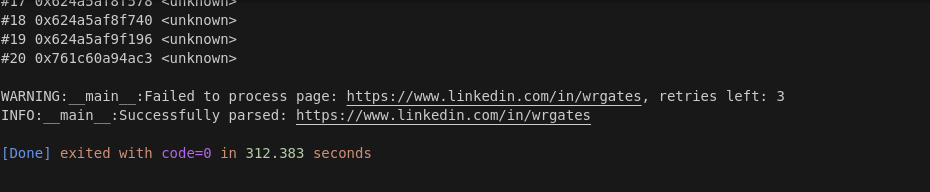 Scraper Performance
This time around, we generated an initial crawl report with 77 results. The full run took 312.383 seconds. 312.383 - 11.197 = 301.186 seconds. 301.186 seconds / 77 results = 3.912 seconds per result.
We're scraping pages even faster than we crawled them! Our overall program is running great!
Legal and Ethical Considerations
According to numerous court cases, scraping the public web is perfectly legal. In this tutorial, we made sure to only scrape publicly available data from LinkedIn.
When scraping private data (data behind a login), that's a completely different story and you're subject to a completely different set of rules and regulations.
Although our crawler and scraper job here are completely legal, we definitely violated LinkedIn's terms of service and robots.txt. You can view their terms here and you may view their robots.txt here.
Failure to comply with these policies can result in suspension or even permanent removal of your LinkedIn account.
If you're unsure whether your scraper is legal or not, consult an attorney.
Conclusion
LinkedIn Profiles are one of the most difficult things to scrape on the web. The ScrapeOps Proxy Aggregator easily bypassed anti-bots and got us through to get the data we need.
By this point, you should have a decent understanding of how to use Selenium and extract data in all sorts of ways. You now should have a solid grasp of parsing, data storage, concurrency, and proxy integration.
You can dig deeper into the tech we used by clicking the links below.
More Python Web Scraping Guides
we've always got something for you here at ScrapeOps. Whether you're just learning how to code, or you're a seasoned dev, you can gain something from our tutorials.
Check out our Selenium Web Scraping Playbook. If you want to learn how to scrape another tricky site, check out the links below!
Then check out ScrapeOps, the complete toolkit for web scraping.