01
Real-time & historical job stats
Easily monitor jobs in real-time, compare jobs to previous jobs run, spot trends forming and catch problems early before your data feeds go down.
Schedule your scraping jobs, monitor their performance & get alerts with ScrapeOps Monitoring & Scheduling.
Monitor unlimited scrapers and pages with the free account.
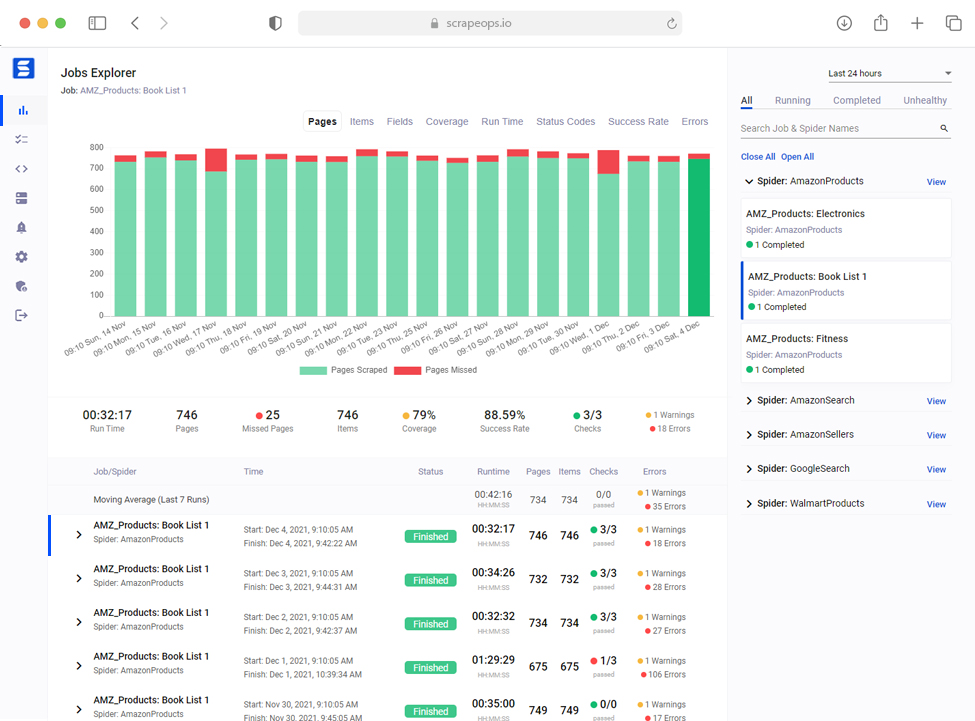
Easily monitor jobs in real-time, compare jobs to previous jobs run, spot trends forming and catch problems early before your data feeds go down.
ScrapeOps checks pages for CAPTCHAs & bans, and the data quality of every item scraped so you can detect broken parsers without having to query your DB.
The ScrapeOps SDK logs any Warnings or Errors raised in your jobs and aggregates them on your dashboard, so you can see your errors without having to check your logs.
ScrapeOps automatically checks every job versus historical averages and custom health checks, then tells you if your scrapers are healthy or not.
Easily configure your own custom health checks and reports, and get alerts how and when you want them. Alerts via Slack, email and more.
Plan, schedule, manage and run all your jobs across multiple servers with a single, easy to use scraper management dashboard. Integrates via Scrapyd and SSH.
ScrapeOps automatically logs and ships your scraping performance stats, so you can monitor everything in a single dashboard.
Effortlessly compare pages & items scraped, runtimes, status codes, success rates and errors versus previous job runs to identify potential issues with your scrapers.
Out of the box, ScrapeOps automatically checks the health of every job versus its historical moving average to see if it is healthy or not. Alerting you when and how you want it.
If that isn’t enough, you can configure custom checks, alerts and reports on any job or spider.

Connect your servers & GitHub with ScrapeOps, and manage your web scrapers across multiple servers from one easy to use job management dashboard.
Deploy, schedule, run, pause and re-run your scraping jobs with our SSH server & GitHub integration.
Learn more →With just 3 lines of code, ScrapeOps gives you all the monitoring and alerting options you will ever need straight out of the box.
Python Scrapy docs →$ pip install scrapeops-scrapy## settings.py# Add Your ScrapeOps API keySCRAPEOPS_API_KEY = 'YOUR_API_KEY'# Add In The ScrapeOps ExtensionEXTENSIONS = {'scrapeops_scrapy.extension.ScrapeOpsMonitor': 500,}# Update The Download MiddlewaresDOWNLOADER_MIDDLEWARES = {'scrapeops_scrapy.middleware.retry.RetryMiddleware': 550,'scrapy.downloadermiddlewares.retry.RetryMiddleware': None,}
 Python SeleniumPython’s most popular headless browser.
 Node.jsNode.js popular Requests, Axios, fetch libraries.
 PuppeteerNode.js most popular headless browser library.
 PlaywrightNode.js’ hot new headless browser library.
Click any integration to register interest.
If web scraped data is mission critical for your business, then ScrapeOps premium features will make your life a whole lot easier.
If you have a hobby project or need only basic monitoring then use our Community Plan for free, forever.
Need a bigger plan? Contact us here.
Included in every Hobby, Startup and Business plan.
ScrapeOps will log any errors & warnings in your scrapers and will display them in your dashboard, along with the tracebacks.
Directly link your hosting provider with ScrapeOps, then provision and setup new servers from the ScrapeOps dashboard.
Give ScrapeOps SSH access to your servers, and you will be able to schedule and run any type of scraper from the dashboard.
Link your GitHub repos to ScrapeOps and deploy new scrapers to your servers directly from the ScrapeOps dashboard.
Group jobs together with your own custom parameters, and monitor their grouped stats on your dashboard.
Create custom real-time scraper health checks for all your scrapers so you detect unhealthy jobs straight away.
Automate your daily scraping checks by scheduling ScrapeOps to check your spiders & jobs every couple hours and send you a report if any issues are detected.
Trigger custom events in your scrapers to log any invalid HTML responses, geotargeting or data quality issues that are specific to your own scrapers.
Monitor your scrapers even when you have a distributed scraping infrastructure, where multiple scraping processes are working from the same queue.
Everything you need to know about ScrapeOps Monitoring & Scheduling.
ScrapeOps Monitoring & Scheduling is a DevOps tool designed specifically for web scraping. It allows you to monitor your scraper performance in real-time, track historical statistics, receive automated alerts, and schedule and manage scraping jobs across multiple servers, all from a single dashboard.
We currently have SDKs for Python Scrapy and Python Requests, with more integrations on the way. The SDK integration takes just a few lines of code to set up and immediately starts logging your scraper performance data.
ScrapeOps automatically tracks pages scraped, items extracted, runtime, status codes, success rates, error rates, request latency, and more. You can compare current job runs against historical averages to quickly identify issues.
Out of the box, ScrapeOps automatically checks every job’s health against its historical moving average. If something looks off (like a significant drop in items scraped or spike in errors) you get alerted via email, Slack, or webhook. You can also configure custom checks and alert thresholds.
Yes! With the job scheduling feature, you can connect your servers and GitHub repos to ScrapeOps, then deploy, schedule, run, pause, and re-run your scraping jobs from our dashboard. It supports cron-style scheduling and manual triggers.
Yes! The Community Plan is free forever and lets you monitor unlimited scrapers and pages. It includes basic monitoring, built-in health checks, and email alerts. Premium plans unlock advanced features like custom alerts, job scheduling, and extended data retention.
Integration takes about 30 seconds. For Scrapy, it’s just 3 lines added to your settings.py file. For Python Requests, you wrap your requests with our SDK. No code changes to your scraping logic are required.
Yes! ScrapeOps allows you to connect multiple servers via SSH and manage all your scraping jobs from one central dashboard, regardless of where they’re running. This is available on Business and Enterprise plans.